Overview
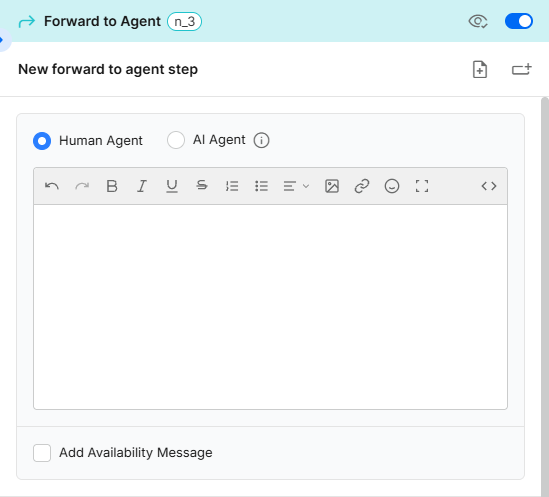
The Forward to Agent step ends the current branch of the automation flow and transfers the conversation for continued handling by either a human agent or an AI Agent.
This guide explains the capabilities and configuration options of the Forward to Agent step, as well as best practices to help you create seamless handoffs, maintain context, and optimize the customer experience throughout their journey.
Forward to a human agent
Key Considerations
A. The Forward to Agent step should be the last step in a branch of the flow. (Other options for ending a branch are the End or Jump steps)
B. By default, when forwarding to a human agent, the step opens a new conversation (object) on the same channel in which the flow is currently running.
You can route the conversation to a different channel or team by selecting a different channel in the Change Channel settings.
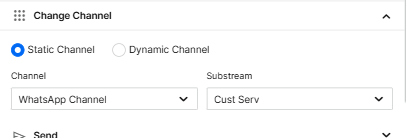
C. When Dynamic Channel is selected as the forwarding mode, the destination channel is determined at runtime based on the values assigned to ForwardStreamId and ForwardSubStreamId using the Set Variables function anywhere in the flow.
D. Forwarding calls from a Voice AI Agent to a human agent
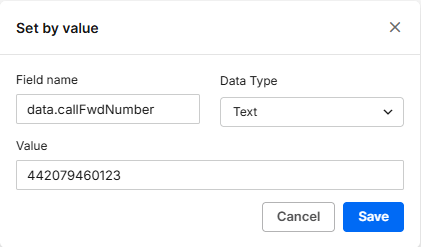
When a Voice AI Agent forwards a call to a human agent, the call center or department phone number must be stored as a variable.
-
At the Forward step or any preceding step, click Set Variable and select Set by value.
-
Enter data.callFwdNumber as the Field name, select Text as the Data type, and enter the phone number, including the country code, as the Value.
-
The Forward to Agent step must include a message that is played to the user before the call is forwarded.
-
Click Save.
Best Practices
A. Create dedicated flow branches for different availability scenarios
- Enable Add Availability Message and select the channel whose availability will be checked.
- Use the Availability Entry Condition capability to display the most appropriate message and routing path based on the department's availability. For example, customers who contact the business outside of normal operating hours can be informed that the department is currently closed and that their call is being transferred to an emergency line or after-hours operator.
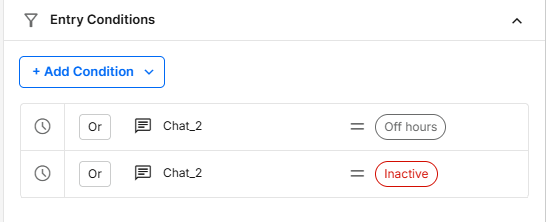
- Repeat this process for other scenarios you anticipate. For example, when all agents are busy, transfer the customer to an alternative channel and display an appropriate message.
B. Provide clear expectations before the transfer
Before forwarding the conversation, inform the customer what will happen next. For example, let them know they are being connected to a human agent, another department, or an after-hours team. This reduces confusion and improves the customer experience.
C. Configure fallback routing paths
Always define alternative routing paths for situations where the target team is unavailable, all agents are busy, or the destination channel is offline. This ensures customers are never left without assistance.
D. Use dynamic routing for skill-based assignments
When different teams handle different types of inquiries, use Dynamic Channel routing together with variables collected earlier in the flow to direct customers to the most appropriate team automatically.
E. Minimize unnecessary transfers
Whenever possible, collect key information before forwarding the conversation. This ensures agents receive the necessary context and reduces the need for customers to repeat information.
Forward to AI Agent
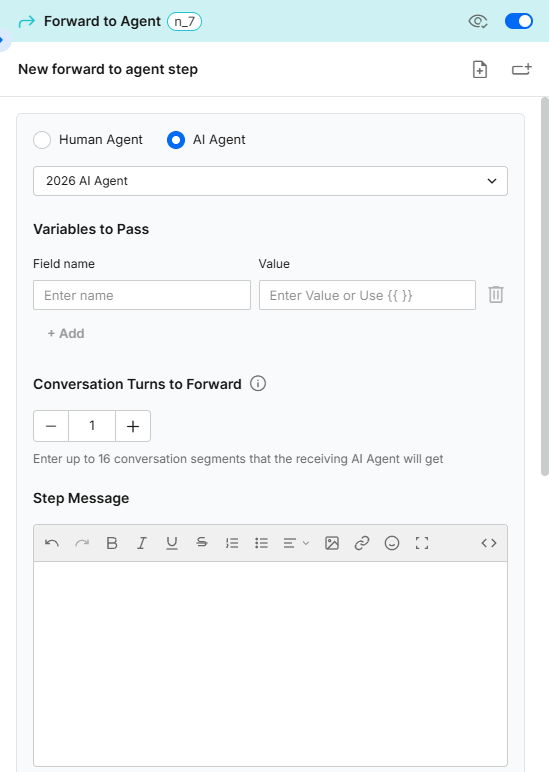
Key Considerations
A. The Forward to Agent step can be used to transfer the conversation to an AI Agent from all types of automations. Use the Jump step in the actual flow to transfer the conversation to an AI chatbot or a non-AI Agent.
B. When a customer is transferred to another AI Agent, you can share conversation history with the receiving AI Agent to improve contextual continuity.
Conversation history is transferred as conversation segments. Consecutive messages from the same participant (customer or AI Agent) are consolidated into a single segment. You can forward up to 8 customer segments and 8 AI Agent segments (16 segments in total).
When selecting 1 (the default value), only the customer's most recent message will be forwarded.
C. In addition to history, the Forward to AI Agent step also supports forwarding variables (field name-value pairs). These variables enable structured data captured during the conversation to be reused by downstream agents, improving decision-making, accuracy, and workflow continuity.
Best Practices
A. Inform the customer about the transfer
The receiving AI Agent should clearly indicate that it is taking over the conversation. Different AI Agents may use different prompts, tones, or areas of expertise, and acknowledging the handoff helps avoid a confusing "personality shift" for the customer.
B. Transfer only the context that is needed
While up to 16 conversation segments can be forwarded, consider passing only the amount of history required for the receiving AI Agent to perform its task effectively. This helps maintain focus and reduces unnecessary context.
C. Use variables for structured information
Whenever possible, pass information such as customer identifiers, product selections, case numbers, language preferences, or intent classifications through variables instead of relying solely on conversation history.
D. Design specialized AI Agents
Use forwarding to create specialized AI Agents for different business functions, such as Sales, Support, Billing, or Scheduling. Specialized AI Agents generally provide more accurate and consistent responses than a single AI Agent handling all topics.
E. Clearly define handoff criteria
Establish explicit conditions for when a conversation should be transferred to another AI Agent. Avoid overlapping responsibilities between AI Agents, which can result in unnecessary handoffs and inconsistent customer experiences.