Overview
Meta has introduced WhatsApp Usernames, allowing users to interact with businesses without sharing their phone number.
As part of this change, Meta has introduced a new identifier called a Business-Scoped User ID (BSUID), which will be used to identify customers who choose not to share their phone number.
To help you navigate these updates without disruption, this guide outlines what this change means for your workflows, how our platform is preparing, and the steps you should take today.
What’s changing?
Historically, businesses have relied on a customer's phone number as their primary identifier. With Meta's gradual rollout of optional customer usernames, users who choose to adopt a username will have their phone numbers hidden by default in application webhooks. When a WhatsApp user adopts a username and chooses to hide their phone number, their phone number may no longer be available in future conversations.
Note: The same user receives a different BSUID for every business they message. Business A cannot use a BSUID to track a customer's interactions with Business B
.png)
Understanding the 30-Day Visibility Window
To support conversation continuity, Meta launched a native contact book infrastructure. This backend system automatically maps and stores phone numbers and BSUID pairs for active threads.
To minimize the risk of losing phone number visibility for existing customers, Meta will continue to include the customer's phone number in webhooks only if at least one of the following conditions is met:
- No Username Adopted: The customer has opted not to set up a public WhatsApp username (default behavior for users).
- Recent Outbound Interaction: You have sent a WhatsApp message or placed a WhatsApp call to the customer’s phone number within the last 30 days.
- Recent Inbound Interaction: You have received a message or call from the customer’s phone number within the last 30 days.
- Contact Book Match: The user's information has already been successfully captured in your Meta-hosted portfolio contact book since its rollout.
Note: Meta evaluates the 30-day interaction lookback per individual business phone number.
What CommBox is Doing on Our End
CommBox has updated its WhatsApp infrastructure to support Meta’s Business-Scoped User ID (BSUID) model. CommBox automatically captures, stores, and maps BSUIDs and WhatsApp usernames to customer records, allowing conversations and customer identities to remain connected even when Meta does not provide a phone number.
At the same time, some business processes may still require a customer's phone number. To support these cases, CommBox provides dedicated tools for requesting and collecting the customer's contact information directly through WhatsApp.
-
WhatsApp username in the customer pane
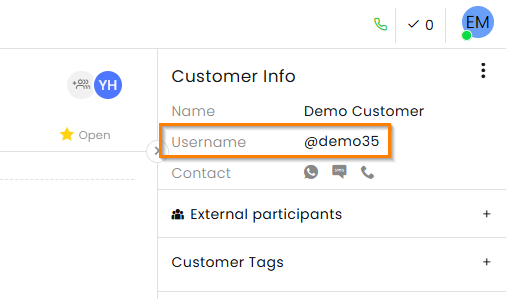
For WhatsApp customers who do not have a phone number on record, their WhatsApp username is displayed in the customer pane and is updated automatically whenever the customer changes it. This gives agents a recognizable customer identifier even when no phone number is available, while the underlying BSUID maintains the connection to the correct customer record.
-
Templates for requesting a phone number
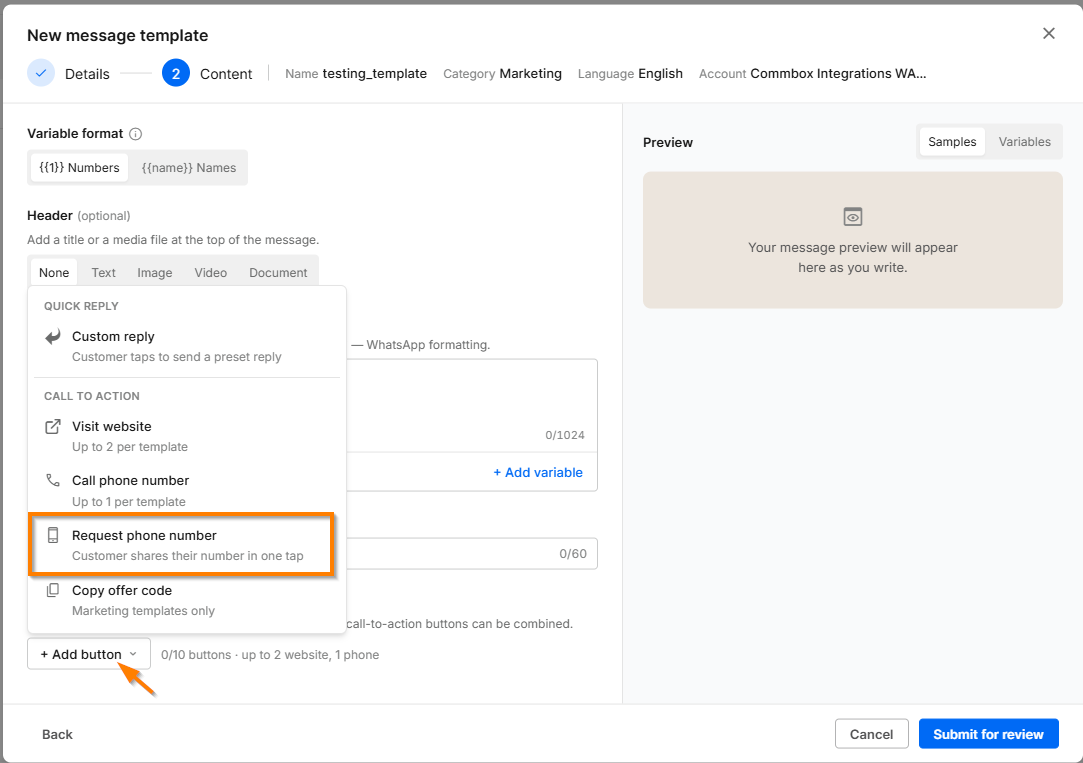
Admins can create dedicated Marketing or Utility templates with a Request Phone Number button, allowing the business to proactively ask BSUID-only customers to share their phone number.
These templates are specifically designed for this purpose and follow Meta’s simplified template structure for faster approval. Only the Body text can be configured, while headers, footers, additional buttons, and other template components are not supported. The contact-sharing button itself is defined by Meta and displayed according to the customer's WhatsApp language.
-
Requesting a phone number from an open conversation
When a WhatsApp conversation is still within the active 24-hour customer service window, agents can request the customer's phone number directly from the Inbox by clicking the Request Phone Number icon. This sends a standalone interactive contact request and does not require a pre-approved template, making it a quick way to obtain missing contact information while already assisting the customer. -
If and when the customer chooses to share their phone number, the number is automatically added to the customer pane, updating the existing customer record with the newly provided contact information, and an activity log is added to the conversation.
Immediate Actions for your Business
- Maintain Regular Outbound Cadences:
Continue structured outbound messaging with active customers. Qualifying interactions reset Meta's 30-day lookback window, so regular communication directly safeguards your ongoing access to customer phone numbers. - Audit Automated Bot Flows & Routing:
Review automated bot journeys, routing rules, or API webhooks that use the phone number as the absolute primary key to look up CRM records or authenticate users. Workflows should be adjusted to accept the BSUID as a valid fallback identifier. (Contact your CSM if you need help with the review process)
WhatsApp Usernames and BSUIDs are currently being rolled out as a pilot in selected countries and are expected to become more broadly available over time. We will continue sharing updates as Meta provides additional guidance.
Questions?
Please contact your CommBox account manager or Customer Success Manager.