Overview
The Autonomous Agent Debugger lets you inspect what happened during a single AI agent conversation — what the agent said, which Abilities (tools) it called, what those tools returned, and why.
The Debugger pulls all sources together into a single, read-only, pretty-printed JSON document that you can view per-conversation.
Important: This is a viewing tool only.
- It does not change how data is generated or stored.
- You cannot edit or replay a conversation from here.
- Some of the fields only appear for Autonomous Agent sessions — i.e., conversations where the agent invoked at least one Ability.
- Context data is kept for 48 hours.
Locating the Conversation ID
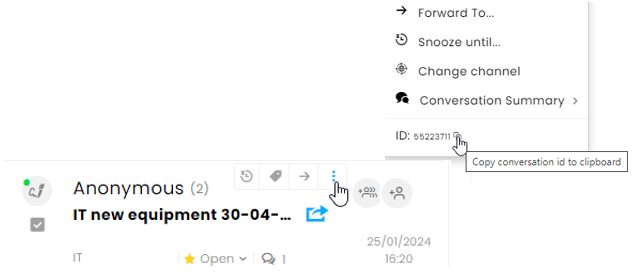
To activate the debugger, you'll need the conversation ID.
- Locate the conversation ID by clicking the 3-dot menu at the conversation summary.
- Click the copy icon at the bottom of the dialog box.
-
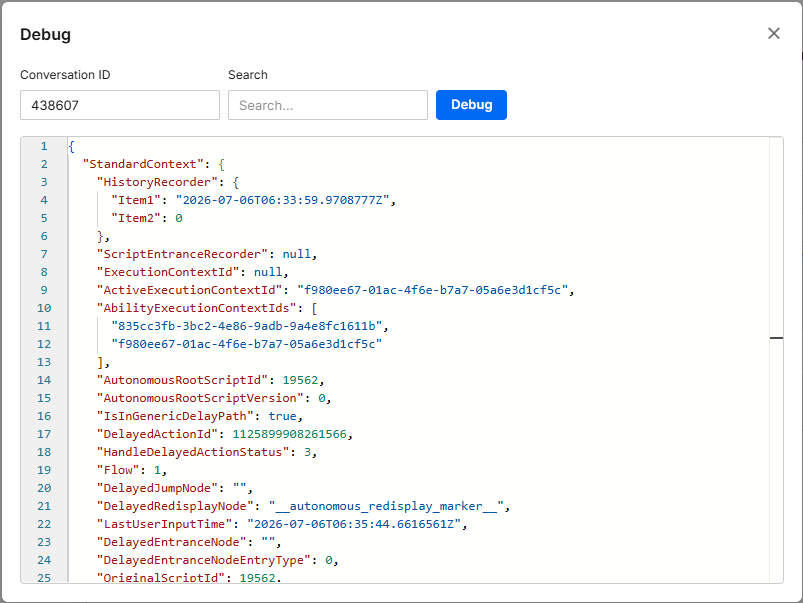
Open the Debugger by selecting Debug from the Test menu at the top of any Flow.

-
Paste the conversation ID and click Debug.
What Data Is Being Combined
The debugger stitches together three independently stored sources:
| Source | What it contains |
|---|---|
| Root automation context | The conversation's top-level script context (.NET, Redis) |
| Ability execution contexts | One stored record per Ability (tool) the agent invoked (.NET, Redis) |
| Autonomous conversation state | The LLM-side state: messages, reasoning, tool calls, extracted variables, and rule/function history (ai-services, Redis) |
Reading the Output
The top level of any debug result has four fields:
{
  "StandardContext":   { ... },   // root automation context
  "AbilitiesContexts": [ ... ],   // one entry per invoked ability
  "AutonomousContext": { ... },   // ai-services state (key masked, config stripped)
  "AutonomousError":   null       // string if the ai-services fetch failed; null on success
}
| Field | Type | What it tells you |
|---|---|---|
StandardContext |
object | The root conversation context. Always present. |
AbilitiesContexts |
array | One entry per Ability invoked. Empty if no Ability ran. |
AutonomousContext |
object | Raw LLM-side state. null if the fetch failed — check AutonomousError. |
AutonomousError |
string | Human-readable explanation if AutonomousContext couldn't be loaded. null means success. |
1. StandardContext — the root conversation record
This is the conversation's top-level context. The single most important field here is:
AbilityExecutionContextIds— a list of IDs, one per Ability invoked. This is your starting point for cross-referencing intoAbilitiesContexts.
Other useful fields:
| Field | Meaning |
|---|---|
ExecutionContextId |
null here always means "this is the root." |
OriginalScriptId |
The conversation's own script ID — used to build its unique conversation ID (see Correlating Data, below). |
LastUserInputTime |
Timestamp of the last user message. |
Note: This list is added to the record only if at least one Ability is called, so ordinary (non-agent) conversations don't incur any additional storage overhead.
2. AbilitiesContexts — one record per tool call
Each entry describes a single Ability invocation: what was called, the inputs used, and the internal path it took.
Example (from the sample — a single buy_new_car call):
{
  "ExecutionContextId": "4cf1c21e-eecb-45f0-b51e-fc7f6d3d2f9b",
  "ScriptData": {
    "OriginalScriptId": 987660668,
    "CurrentNodeAddress": "987660668:n_3",
    "History": [ "987660668:node_0", "987660668:node_0", "987660668:n_4" ],
    "CallingFrame": {
      "CalledFunctionName": "buy_new_car",
      "ToolCallId": "call_ONlplINZYcArBwyXiS4gdWJP",
      "InputParameters": { "test": 30 },
      "ExecutionResult": null
    },
    "Data": { "data": { "test": 30 } }
  }
}
| Field | What to use it for |
|---|---|
ExecutionContextId |
Matches an ID listed in StandardContext.AbilityExecutionContextIds. |
ScriptData.History / CurrentNodeAddress |
The path the Ability took internally. |
CallingFrame.CalledFunctionName |
The name of the tool the agent called. |
CallingFrame.ToolCallId |
The key to cross-reference this call with the LLM-side data (see below). |
CallingFrame.InputParameters |
The arguments passed in. |
CallingFrame.ExecutionResult |
The result handed back — usually null unless the Ability explicitly returns one here. |
If an Ability's context has expired or been evicted from storage, ScriptData will simply be null. The invocation can still be traced through the autonomous side (see function_execution_history, below).
3. AutonomousContext — the LLM-side state
This section contains the actual conversation transcript and everything the agent reasoned through.
a) messages[] — the conversation transcript
Each message has a type: human, ai, or tool.
- Human/plain turns just carry
content. - AI turns that call a tool carry a
tool_callsarray with the tool name, arguments, and a uniqueid. - Tool results come back as a
toolmessage, matched to the calling turn viatool_call_id.
Example: The customer asked about his status ranking. The AI Agent invoked the "Customer_tier" ability (tool), and responded to the customer.
"AutonomousContext": {
  "context_id": "RjcIfQ543bEd133Tuu4_fSw%3d%3d",
  "messages": [
    {
      "type": "human",
      "content": "what is my tier in the company?",
      "tool_calls": null,
      "tool_call_id": null,
      "responses_content": null
    },
    {
      "type": "ai",
      "content": "",
      "tool_calls": [
        {
          "name": "Customer_tier",
          "args": {},
          "id": "call_MOniwia0Gt3wSVbBvWjMdz8q",
          "type": "tool_call"
        }
      ],
      "tool_call_id": null,
      "responses_content": null
    },
    {
      "type": "tool",
      "content": "{\"success\":true,\"error\":null,\"data\":{\"user.permission\":1},\"message\":null}",
      "tool_calls": null,
      "tool_call_id": "call_MOniwia0Gt3wSVbBvWjMdz8q",
      "responses_content": null
    },
    {
      "type": "ai",
      "content": "You are not considered a VIP in our company at this time.",
      "tool_calls": null,
      "tool_call_id": null,
      "responses_content": null
    }
  ]
}
This shared ID is the thread that ties everything together — see Correlating Data below.
Hosted tools (MCP) are a special case. If the agent used a tool hosted directly on an external MCP server (rather than the normal internal Ability path), the raw call/response is preserved in a field called responses_content, instead of appearing in the usual results ledger. Two things can appear there:
mcp_list_tools— a record of what tools a server advertised.mcp_call— an actual invocation, with its arguments, output, and status.
b) Variable state
| Field | Meaning |
|---|---|
initial_params |
The parameters the conversation started with. |
extracted_entities |
Current values the agent has extracted/resolved during the conversation. |
available_var_names |
All variable names the agent is allowed to reference. |
parameter_defaults |
Default values behind each parameter. |
rule_last_triggered_params |
The parameters each rule last fired with. |
c) function_execution_history[] — results ledger
One entry per Ability/function call that returned a result to the agent — including the name called, parameters sent, success/failure, and any data or error returned.
Note: Only typical Abilities appear in this result-oriented function. The AI called upon the function, the function ran in the backend system (.NET/Abilities pipeline), and the result was sent back to the AI.
Calls that never return a result to the AI, such as conversation-ending Abilities (e.g., when customers hang up), or hosted-MCP calls (when the AI model talks to external tool servers), can be found in
responses_content. To see every invocation, checkmessages[].tool_callsand the Ability contexts.
d) rule_execution_history[] — rule evaluations
One entry per rule evaluation, showing whether it triggered, why it may have been blocked (missing parameters, awaiting confirmation), and what parameters it evaluated against.
e) Control & identity fields
| Field | Meaning |
|---|---|
context_id |
Internal ID for this piece of state. |
conversation_id |
Built from brand + object + script ID (see below). |
pending_function |
Set if the agent is paused waiting on an external function result. |
pending_confirmation |
Set if the agent is waiting on user confirmation before executing something. |
recursion_limit |
Max number of internal steps allowed per turn. |
openai_api_key |
Always shown masked — never the real key. |
Correlating Data Across Sections
Shared IDs link the three sources. Use this table to trace a specific event across the whole document:
| To link… | Match this… |
|---|---|
| Root context → an Ability's context | StandardContext.AbilityExecutionContextIds[i] == AbilitiesContexts[i].ExecutionContextId |
| An Ability call → the LLM's tool call | CallingFrame.ToolCallId == messages[].tool_calls[].id == messages[type=tool].tool_call_id == function_execution_history[].tool_call_id |
| The whole document → the ai-services record | conversation_id = {brandId}_{objectId}_{OriginalScriptId} |
Worked example: In the sample, the ID call_ONlplINZYcArBwyXiS4gdWJP appears in four places — the Ability's CallingFrame.ToolCallId, the AI message's tool_calls[0].id, the matching tool-result message's tool_call_id, and the entry in function_execution_history. Following that one ID lets you see the entire lifecycle of that single tool call: what was asked for, what ran, and what came back.
Error & Empty States
The debugger is designed to give a clear explanation when something is missing.
| Situation | What you'll see |
|---|---|
| Plain conversation (no AI, no Abilities) | Falls back to showing just the bare root context. |
| An Ability's context expired/was evicted | That entry's ScriptData is null; the rest of the document is unaffected. |
| ai-services unreachable/missing API key | AutonomousContext is null, with an explanatory AutonomousError. |
| Conversation expired in ai-services | AutonomousContext is null; error explains it wasn't found. |
| ai-services returned an error status | AutonomousError reports the status code. |
| Autonomous data couldn't be parsed | AutonomousError explains the parse failure. |
| Missing/invalid object or stream ID | An error field is written instead of a context. |
Quick Reference — Where to Look For…
| I want to know… | Look here |
|---|---|
| Which tools did the agent call? | AbilitiesContexts[].ScriptData.CallingFrame.CalledFunctionName or messages[].tool_calls |
| What arguments were passed? | CallingFrame.InputParameters |
| What did the tool return? | function_execution_history[].data (or responses_content for hosted MCP calls) |
| Why didn't a rule fire? | rule_execution_history[] — check blocked_missing_params / blocked_awaiting_confirmation |
| What variables does the agent currently have? | AutonomousContext.extracted_entities |
Why is AutonomousContext null? |
AutonomousError |