Overview
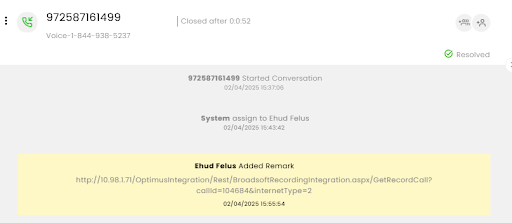
CommBox’s voice integration enables seamless management of external voice conversations within the CommBox environment. This guide outlines how to create and manage a voice conversation in CommBox that originates from an external voice platform.
By leveraging a set of API calls, you can:
• Create voice conversation objects in CommBox
• Assign them to available agents
• Attach recordings and transcripts
• Properly resolve the conversation
Note: All API calls must include the appropriate channel ID.
Conversation Lifecycle
This integration supports the full lifecycle of voice interaction:
- Conversation Creation – Create a new voice conversation with appropriate metadata.
- Agent Assignment – Assign the conversation to an agent in CommBox based on the availability, granted permissions, and assigned roles.
- Call Documentation – Add recordings, transcripts, and remarks.
- Conversation Resolution – Close the interaction correctly.
Conversation Creation
To open a conversation in CommBox, use the following endpoint:
POST /streams/{streamId}/objects
The Stream ID is the CommBox-generated number/code for the channel.
Key Fields:
- "Type": 8 – Voice conversation type. See: /Enums/ObjectType
- "StatusId": 8 – Conversation in-process. See: /Enums/ObjectStatusType
- "conversation_status": "CONNECTED"
- "call_direction": "INCOMING"
- "agent_id": {agentId}
- "to": phone number including country code
- "call_duration": ""
Payload Example:
POST https://api.commbox.io/streams/9MhWTiey6VKlmSoWFeLZuw%3d%3d/objects
{
  "data": {
    "Type": 8,
    "StatusId": 8,
    "StreamProviderType": 5,
    "StreamProviderId": "9ydggtfgtM5hWTiehy6VjKfglmSoWFdyddsff5e",
    "UserStreamProviderId": "972587161499",
    "UserStreamProviderType": 5,
    "Content": {
      "conversation_status": "CONNECTED",
      "call_direction": "INCOMING",
      "agent_id": "28361974",
      "to": "972587161499",
      "call_duration": ""
    },
    "Message": "Aspire Voice Conversation 4"
  }
}
Conversation Assignment
Once the conversation is created, assign it to a designated agent in CommBox* using the following endpoint:
POST /managers/{agent_Id}/assignments?objectId={conversation_Id}
Key Fields:
• "agent_Id ": A CommBox-generated number for the agent.
• “conversation_Id “: A CommBox-generated number for the conversation (object)
Payload Example:
POST https://api.commbox.io/managers/28361974/assignments?objectId=69716571
[*] To retrieve the agent ID, use this API: Get Managers
Add Recording and Transcription
After the voice call ends, you can add the call recording and transcription to the Voice Conversation in CommBox.
Upload and Transcribe a Recording
If you want to upload the call recording and have it transcribed in CommBox, we recommend using the Transcribe a Call Recording API.
This API adds the recording to the conversation and processes it for transcription. The resulting transcript is added to the conversation as speaker-attributed messages.
The recording can be provided in one of the following ways:
- File upload – Upload the audio file directly using
multipart/form-data. - Recording path – Provide the path to a recording on the Voice channel's configured recording domain.
- Existing recording activity – Provide the
activity_idof a call recording that already exists in the CommBox conversation.
Use the CommBox Object ID of the Voice Conversation when submitting the transcription request.
For the complete request structure, parameters, and examples, see Transcribe a Call Recording.
Add Additional Remarks
To add additional textual information or context to the conversation, use the following endpoint:
POST /objects/{object_Id}/remarks
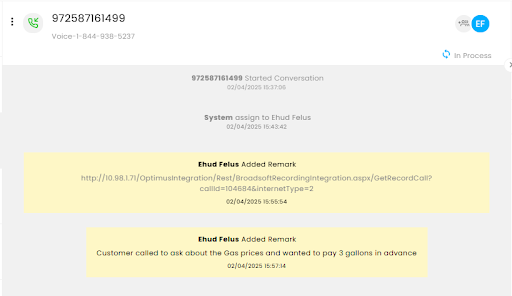
For example, you can use a remark to add a call summary or other information received from the external Voice platform.
Example:
{
  "data": {
    "Text": "Customer called to ask about the gas prices and wanted to pay for 3 gallons in advance.",
    "ManagerId": 28361974
  }
}
Set Conversation to Resolved
Step I: Set the Call status to DISCONNECTED using this endpoint:
/objects/{object_Id}/content
Key Fields:
• "conversation_status": "DISCONNECTED"
• "call_direction": "INCOMING"
• "agent_id": {agentId}
• "to": phone number including country code
• "call_duration": ""
Payload Example:
POST https://api.commbox.io/objects/69716571/content
{
    "data": {
        "conversation_status": "DISCONNECTED",
        "call_direction": "INCOMING",
        "agent_id": "28361974",
        "to": "441394420749",
        "call_duration": ""
    }
}
Step II: Set the Conversation to Resolve (and the Agent gets unassigned) using this endpoint:
POST /objects/{object_Id}/status/2
Conversation Status: /Enums/ObjectStatusType (2 is Resolved)
Example:
POST https://api.commbox.io/objects/69716571/status/2