Overview
The Tracker capability tracks customer activity within CommBox chat applications to provide information about the customer’s device and their activity within the platform, helping agents better understand the customer’s environment and interactions.

Key Considerations
-
The Tracker is supported for Chat, Video Chat, and Voice Chat applications, available by clicking the globe icon in those applications.
Note that in Automation conversations, this icon will open the actual AI Agent/Chatbot. -
Tracking begins only for chat channels installed after the Tracker is activated.
-
Device and browser information is based on the data provided by the customer’s browser and device and may not always identify the exact device model.
-
Location information derived from an IP address is approximate and should not be treated as the customer’s exact physical location.
Derived Information
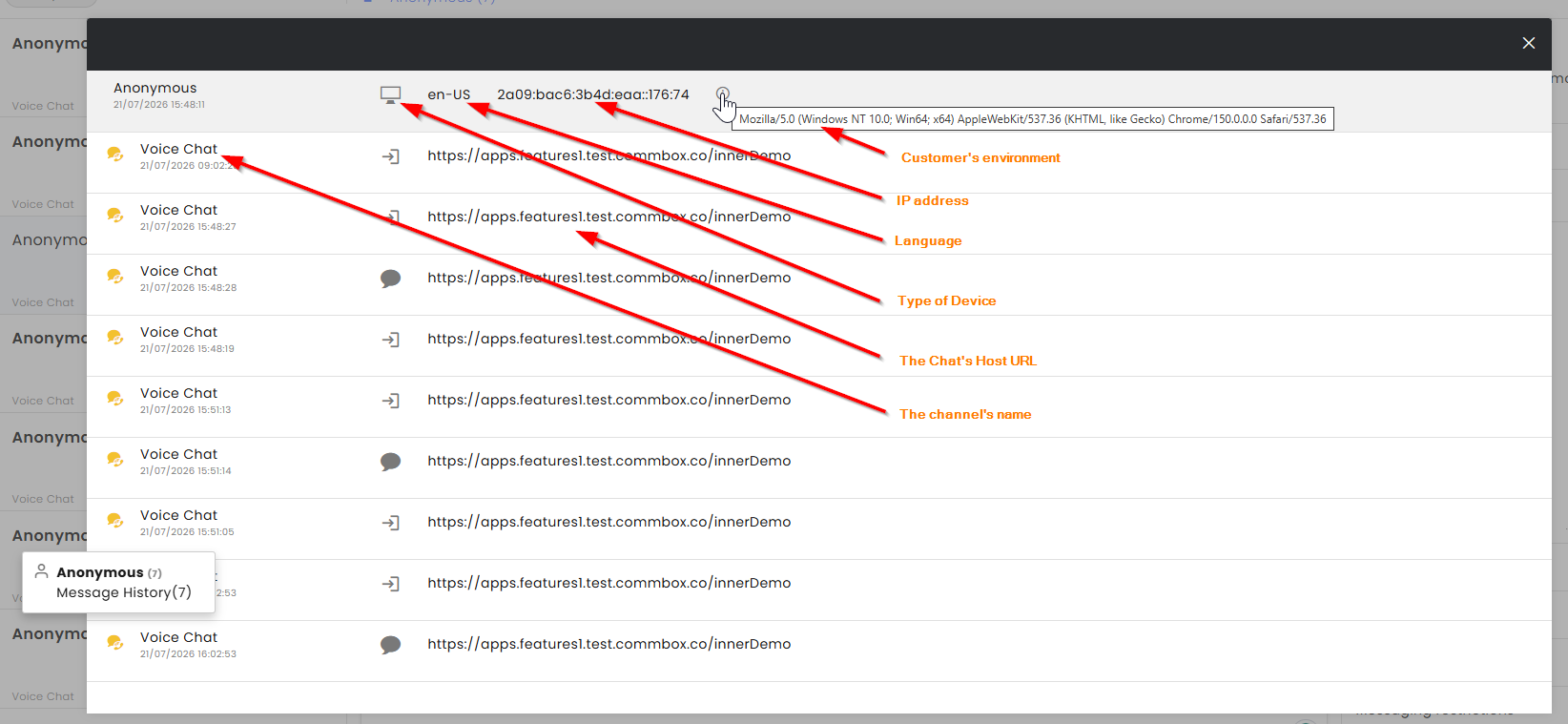
- Device type: Desktop/Mobile device (icons)
- Language code: es-US (Spanish used in the USA)
- IP address: 181.178.202.35 (You can derive an approximate location - typically country and often city/region, but not an exact physical address - as well as the ISP/network provider)
- Device string: - by clicking the tooltip
Device String Example

Mozilla/5.0 (iPhone; CPU iPhone OS 26_5_2 like Mac OS X)
AppleWebKit/605.1.15 (KHTML, like Gecko)
CriOS/150.0.7871.113
Mobile/15E148
Safari/604.1
What can be derived
| Part of the string | Meaning |
|---|---|
Mozilla/5.0 |
Historical compatibility token. It does not mean Mozilla/Firefox. |
iPhone |
The device identifies itself as an iPhone. |
CPU iPhone OS 26_5_2 |
The OS identifies as iOS 26.5.2. |
like Mac OS X |
Compatibility syntax used by iOS. It does not mean the device is a Mac. |
AppleWebKit/605.1.15 |
Apple's WebKit browser engine. |
CriOS/150.0.7871.113 |
CriOS means Google Chrome on iOS. |
Mobile/15E148 |
Identifies a mobile WebKit environment/build token. |
Safari/604.1 |
A Safari compatibility token. Its presence does not mean the Safari app was used. |