Overview
WhatsApp deliverability depends not only on technical configuration but also on how Meta evaluates the quality, relevance, and engagement of your messages. Businesses that send relevant, personalized, and expected communications typically achieve higher delivery rates, better customer engagement, and stronger sender quality ratings.
This guide outlines best practices for maximizing WhatsApp campaign performance and maintaining a healthy sender reputation.
1. Understand Meta's Delivery Controls
Meta continuously evaluates message quality and customer engagement to protect users from spam and unwanted communications.
Key factors that affect deliverability include:
- Message relevance
- Customer engagement
- Opt-in quality
- Block and spam report rates
- Message frequency
Marketing templates are subject to additional delivery controls designed to maintain a healthy messaging ecosystem. Customers who do not engage with marketing messages may receive fewer future marketing messages from businesses.
Recommendation: Focus on relevant, customer-centric communication rather than high-volume promotional campaigns.
2. Use the Correct Message Category
Choosing the correct template category is one of the most important factors in maintaining deliverability.
Utility Templates
Use Utility templates for:
- Appointment reminders
- Order confirmations
- Shipping notifications
- Account updates
- Service notifications
Utility templates generally achieve higher delivery rates because they provide information that customers expect and find valuable.
Marketing Templates
Use Marketing templates for:
- Promotions
- Discounts
- Product announcements
- Cross-sell and upsell campaigns
- Re-engagement campaigns
Marketing templates are subject to stricter delivery controls and may not be delivered if Meta determines that a customer has recently received too many marketing messages or is unlikely to engage.
Enable Auto Accept WhatsApp Decision
When creating templates, we recommend enabling Auto Accept WhatsApp Decision.
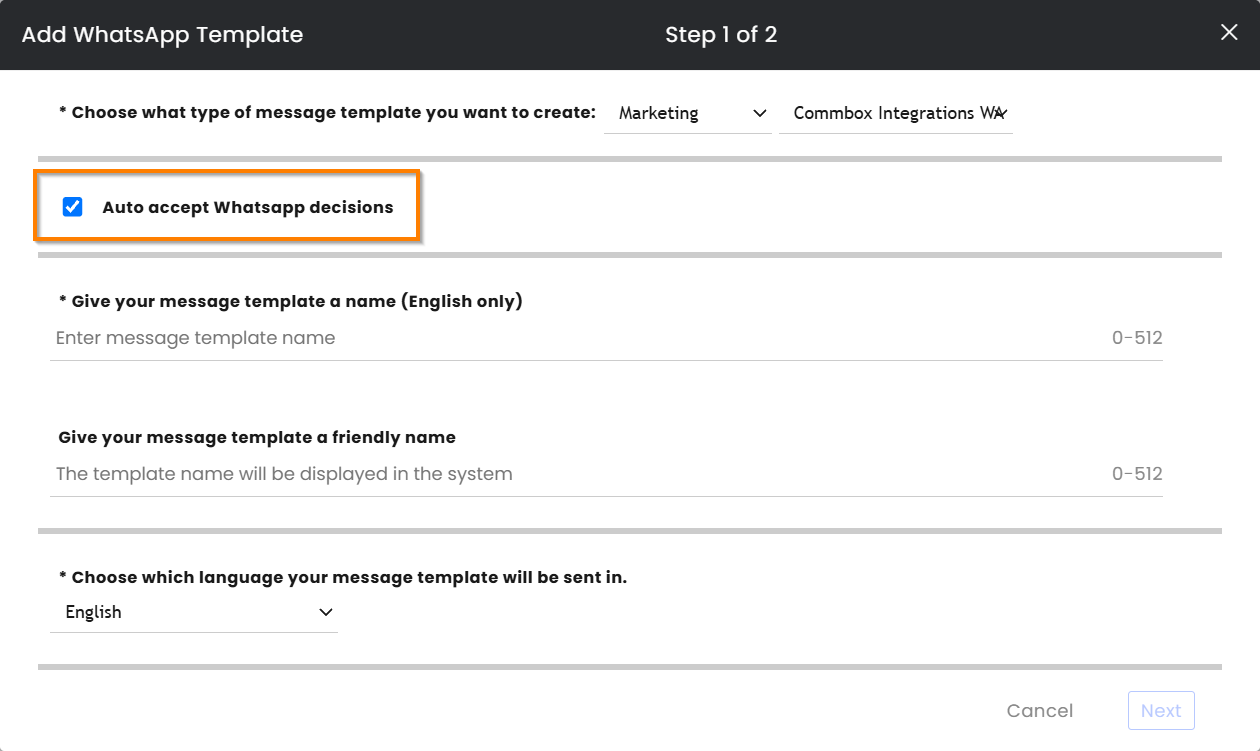
Meta may automatically recategorize a submitted template if its content does not match the selected category. Enabling automatic acceptance allows the approval process to continue without requiring manual resubmission.
3. Optimize Message Content
Message content directly influences both template approval and ongoing quality ratings.

Avoid
- Generic greetings
- Overly promotional language
- Excessive marketing wording
Prefer
- Personalization
- Clear and factual information
- Concise messaging
Instead of:
Don't miss our amazing event tomorrow!
Use:
Hi John, your scheduled session begins tomorrow at 10:00 AM.
The more closely a message resembles a useful customer communication, the more likely it is to achieve strong engagement and maintain a healthy quality rating.
4. Use the "Envelope Strategy"
Rather than sending long messages directly through WhatsApp:
- Send a short, personalized message.
- Attach or link a branded PDF containing the detailed information.
Benefits:
- Reduced spam risk
- Improved readability
- Better sender quality score
- Enhanced customer experience
5. Maintain a High Quality Rating
Meta assigns quality ratings to both phone numbers and templates based on customer feedback and engagement.
Encourage Contact Saving
Customers who save your business number are more likely to receive future messages.
Increase Engagement
Positive interactions improve sender reputation:
- Replies
- Reactions
- Customer engagement
Improve Relevance
Target messages to the appropriate audience segments.
Benefits:
- Fewer spam reports
- Better delivery rates
- Healthier sender reputation
Monitor template quality ratings regularly and review campaigns that generate negative feedback.
6. Collect and Respect Customer Opt-Ins
Only send WhatsApp messages to customers who have explicitly agreed to receive them.
Best practices:
- Collect clear WhatsApp-specific consent.
- Explain what type of messages customers will receive.
- Maintain records of opt-ins.
- Honor unsubscribe requests immediately.
Strong opt-in practices improve engagement and reduce spam complaints.
7. Implement Easy Opt-Out Management
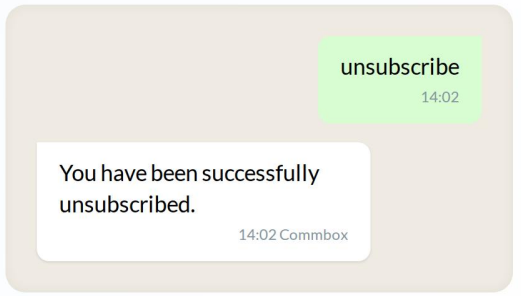
Provide customers with a simple way to unsubscribe.
Example keywords:
- unsubscribe
- remove
Automated opt-out handling helps:
- Reduce spam complaints
- Improve compliance
- Protect sender quality
- Improve campaign performance
8. Use SMS as a Backup Channel
For critical communications such as:
- Emergency notifications
- Service disruptions
- Time-sensitive updates
- Important reminders
Use SMS as a fallback when WhatsApp delivery cannot be guaranteed.
Best Practices Checklist
✓ Prefer Utility over Marketing messages whenever possible
✓ Personalize every message
✓ Keep messages short and relevant
✓ Use PDFs or links for detailed content
✓ Encourage customer engagement
✓ Honor opt-out requests automatically
✓ Use SMS for critical communications
✓ Segment audiences carefully