July 2026 Release Notes
Release Date: July 7th, 2026
Release Notes Publication: July 1st, 2026
WhatsApp Security
New – WhatsApp Business-Scoped User ID (BSUID)
.png)
Meta is introducing a new identification system for WhatsApp Business called BSUID (Business-Scoped User ID).
Instead of identifying users solely by their phone number, WhatsApp will now support an additional identifier similar in concept to a username (as used in platforms like Instagram). Each user-business relationship will be assigned a unique, alphanumeric BSUID (e.g., BR.1A2B3C...), which the user can choose as their identifier.
This design improves privacy by ensuring that businesses cannot use a single identifier to track or profile users across contexts or services.
Impact:
Businesses will be required to update their CRM systems and API integrations to support BSUIDs in addition to, or instead of, phone numbers.
With version 26.7.0.0, CommBox supports BSUIDs, allowing clients to use either the customer’s phone number or BSUID as the stream-provider-id for customer identification.
Click here to learn more about this topic.
API Key
New – Email Notification for API Key Expiration
.png)
Admins can now receive notifications before an API key expires, helping ensure uninterrupted integrations and services. Notifications can be delivered via email, an in-app banner, or both, providing flexibility in how expiration alerts are received.
Alerts can be sent to multiple recipients, at predefined expiration thresholds, making it easier for teams to stay informed and take action before an API key expires. These proactive notifications help reduce the risk of service disruptions caused by expired API keys.
Click here for the updated user guide.
API Customers' Requested Feature
New – Third-party Service Alerts - New Module
.png)
Organizations can now automatically monitor and log errors from external services, including credit card issuers and other third-party APIs, significantly improving operational resilience by reducing downtime, minimizing customer impact, and shifting from reactive troubleshooting to proactive incident management.
Previously, failures from external services (such as HTTP 500 or 404 responses) were only detectable through manual review of synchronization logs, which limited visibility into integration issues.
With this enhancement, CommBox now automatically detects repeated failures from external services, logs and tracks integration errors in a structured way, and provides improved visibility into third-party service health, enabling faster incident response and troubleshooting.
Click here to learn more about this topic.
Campaigns Customers' Requested Feature
New – Campaign Follow-Up
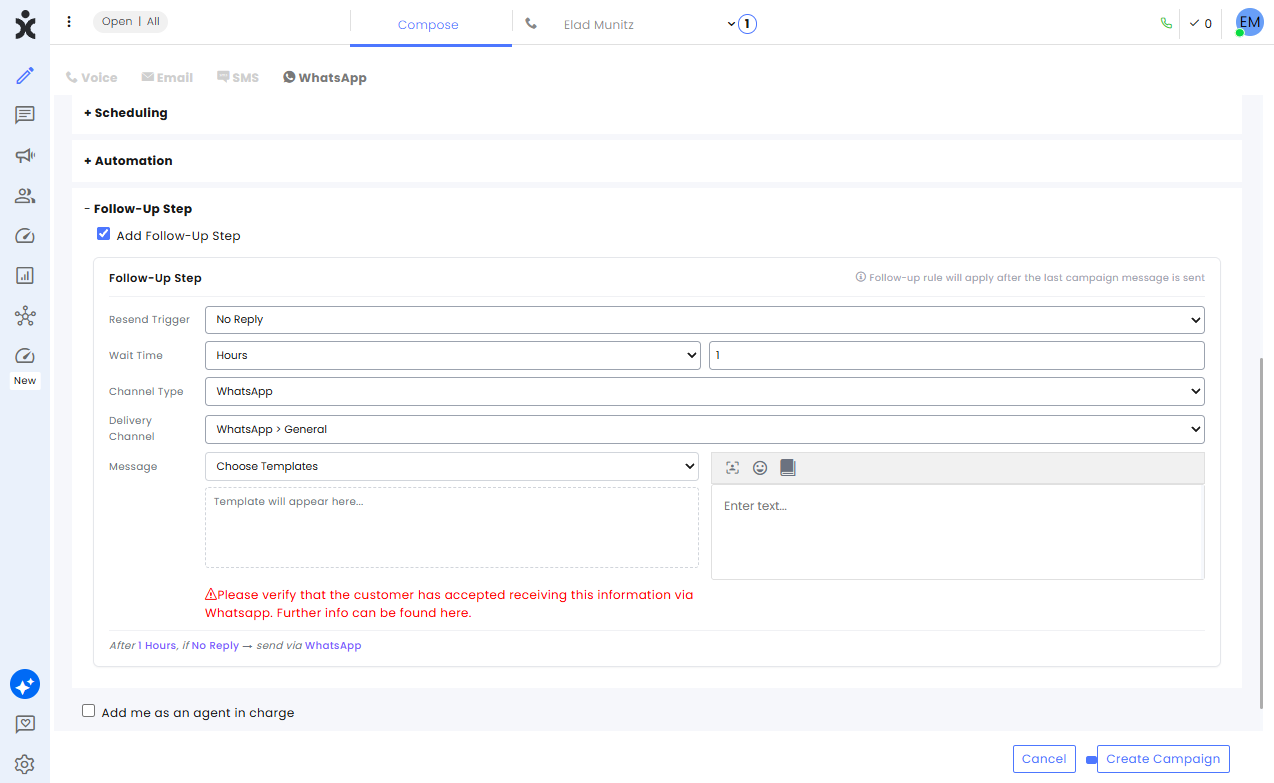
Campaign managers can now configure an optional follow-up campaign for customers who did not receive the original campaign message.
The follow-up is triggered by a condition, and can be sent through a different channel or module, helping increase delivery rates while avoiding duplicate messages to customers who have already received the original campaign.
Email Customers' Requested Feature
Enhancement – Multiple Forwarding Addresses for Email Channels
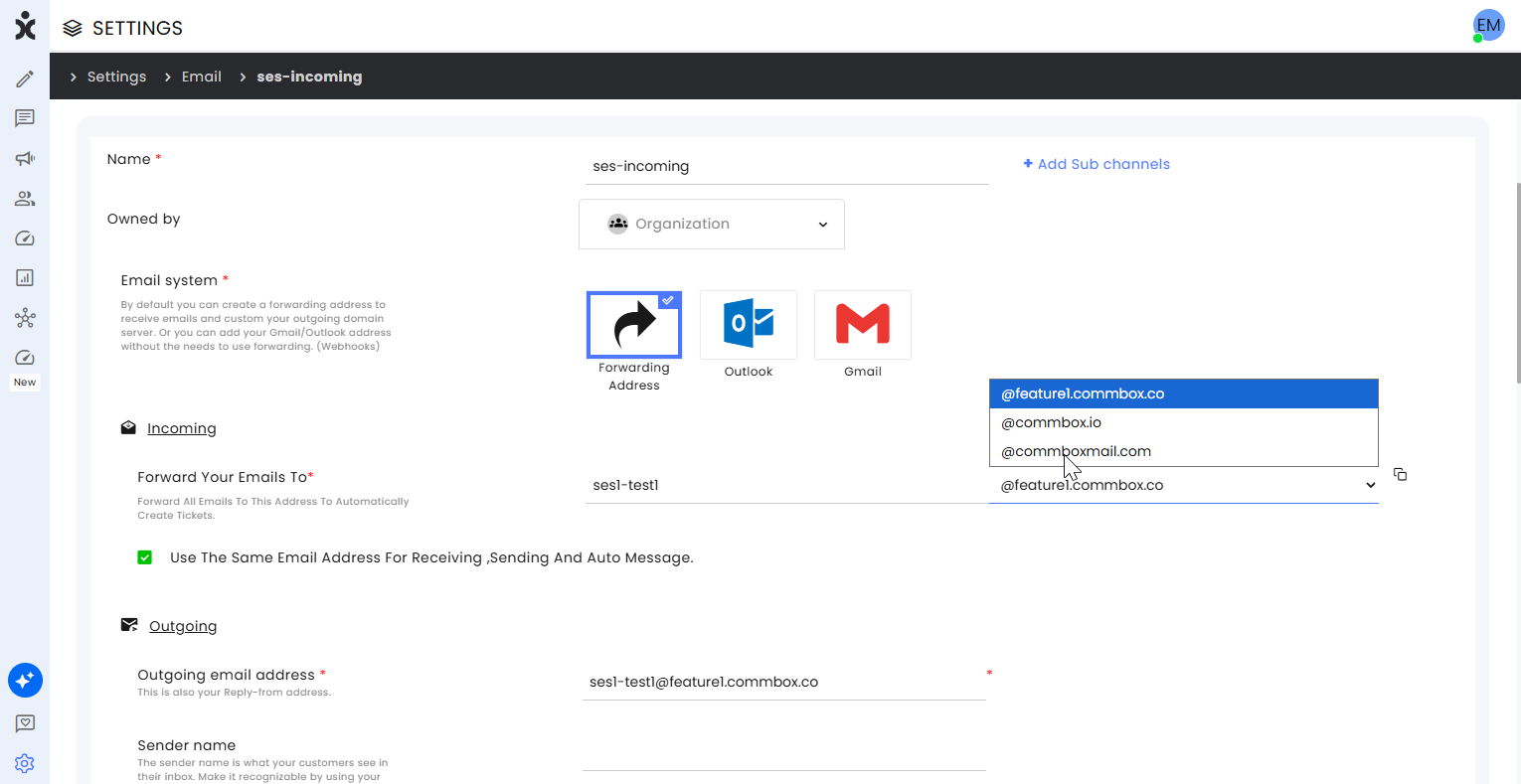
CommBox now supports configuring multiple forwarding email addresses per email channel, including custom domains. This allows administrators to manage email routing directly from the product UI or API without requiring Platform or DevOps involvement.
Previously, only a single forwarding address was supported per channel, and changes required manual backend updates. With this enhancement, users can add, update, or remove multiple forwarding addresses per channel in a self-service manner.
The system validates email format, maintains backward compatibility with existing configurations, and logs all changes for audit and traceability.
Microsoft 365 Security Customers' Requested Feature
Enhancement – Microsoft 365 Integration Security Enhancement
The Microsoft 365 email integration now uses a centralized and more secure authentication flow that aligns with Microsoft's recommended security practices for multi-tenant SaaS applications.
This enhancement improves security and privacy by ensuring that Microsoft authentication is managed through a single CommBox-controlled endpoint, rather than relying on customer-specific authentication URLs. As a result, customer environments remain better isolated, and organizations with strict security and compliance requirements can more easily adopt and maintain the integration.
In addition to strengthening security, this change simplifies the setup and onboarding process for new Microsoft 365 integrations and reduces ongoing administrative overhead. The user experience remains unchanged, and no action is required from existing customers.
CSAT
Enhancement – Survey Confirmation Page
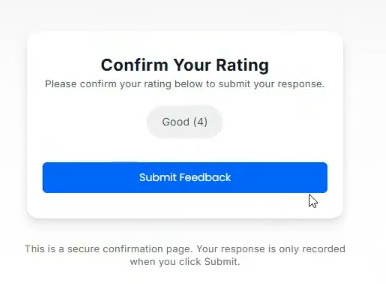
CommBox now introduces a confirmation landing page for email-based CSAT/NPS surveys to prevent false-positive responses from email security scanners (e.g., Microsoft Defender).
Previously, selecting a survey rating in an email immediately submitted the response via a direct link, which could result in unintended submissions from automated link scanning.
With this update, selecting a rating now opens a survey landing page where the chosen rating is displayed. The user must explicitly click Submit to record the response, ensuring that only intentional user actions are captured and improving survey data accuracy.
WhatsApp Customers' Requested Feature
Enhancement – WhatsApp Data Localization (EU Data Residency)
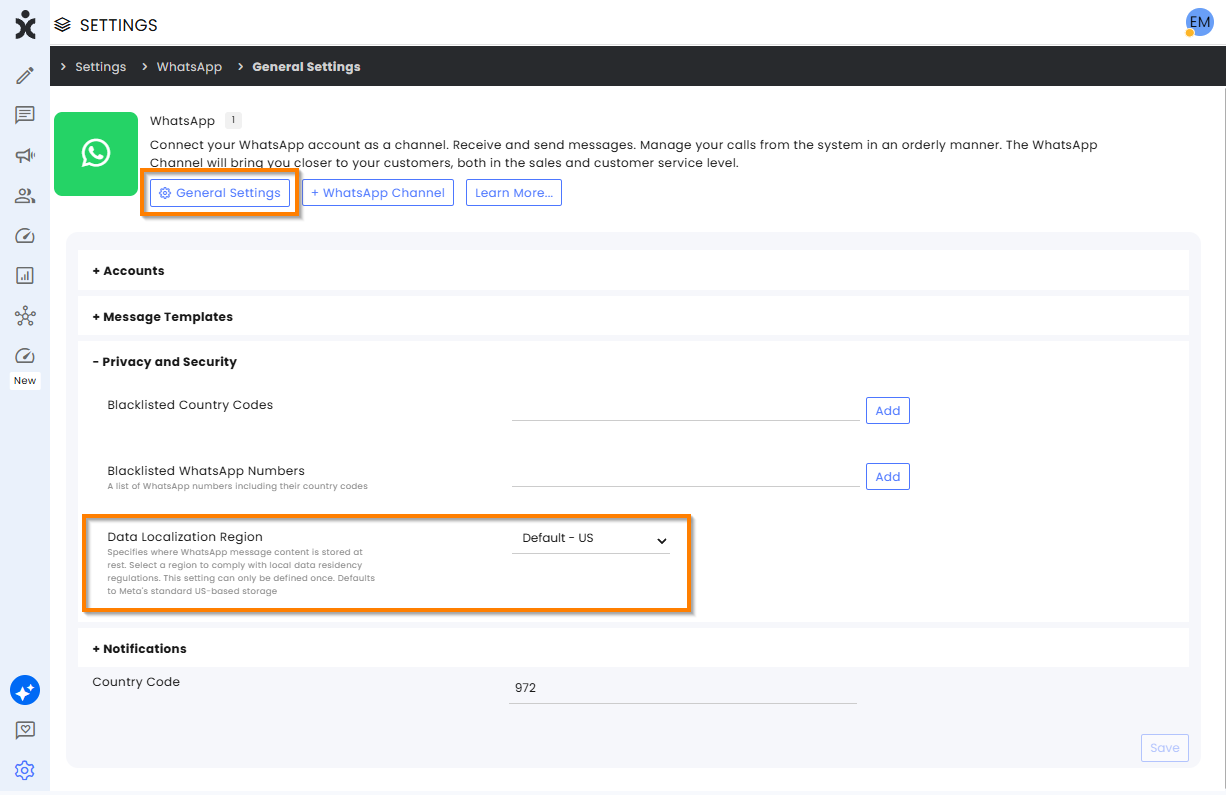
CommBox now supports data localization for WhatsApp Cloud API phone numbers, allowing organizations to store WhatsApp data in a selected geographic region. This enhancement helps businesses meet regional data residency and compliance requirements by ensuring that WhatsApp data is stored in the designated location.
The selected region is applied during phone number registration and the onboarding process. Once configured, any new WhatsApp Cloud API phone numbers will automatically use the local storage settings and associate the phone number with the chosen data region.
To configure the data residency region, navigate to Settings > WhatsApp > General Settings tab. Expand the Privacy and Security section, select the desired region from the Region dropdown list (US is selected by default), and click Save.
Statuses Compose Customers' Requested Feature
Enhancement – Change Ticket Status from Compose Interface
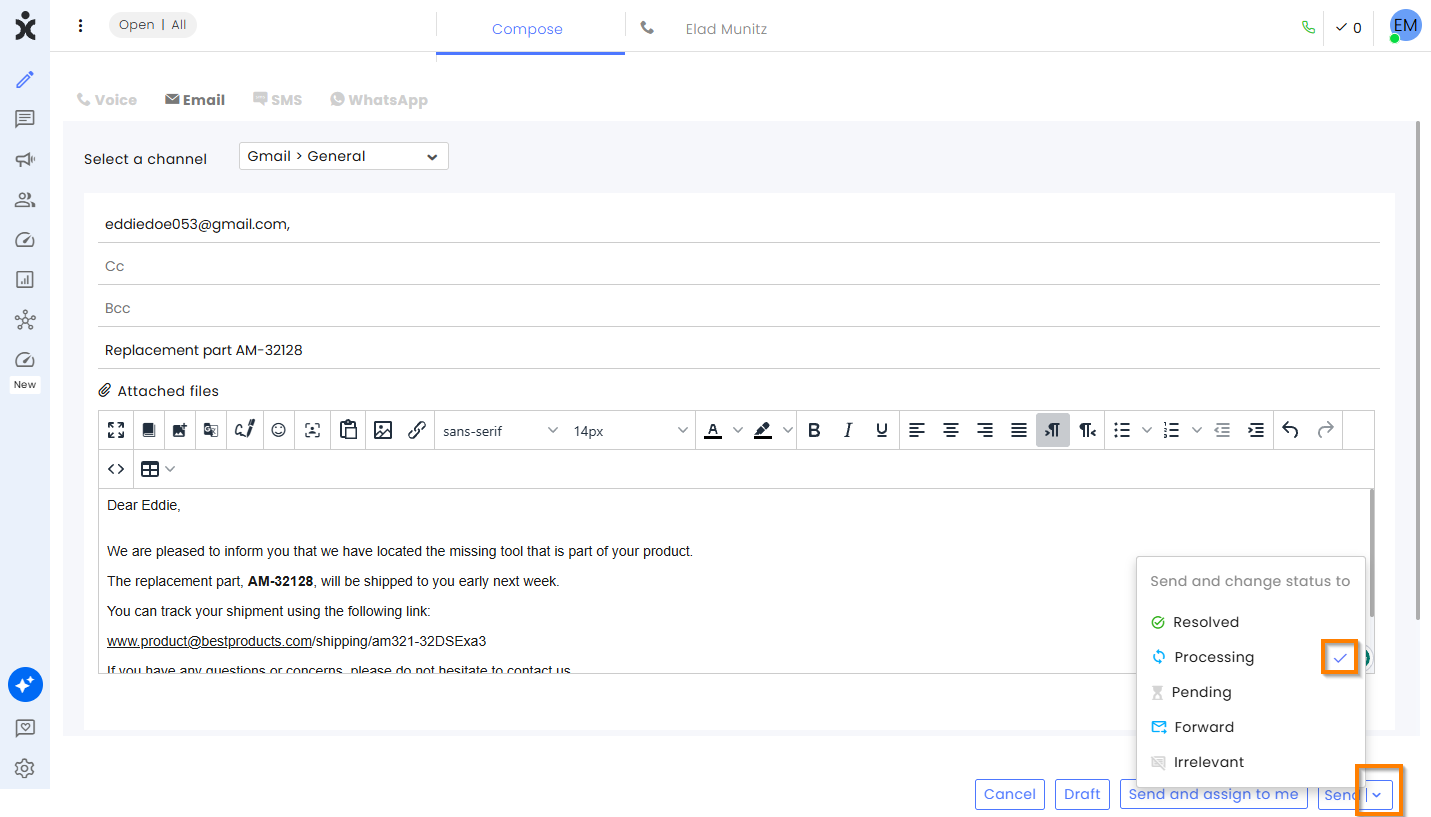
Support agents can now update ticket status directly from the Compose interface when sending emails, reducing workflow friction and eliminating the need to switch between screens.
Previously, status changes were only available from the Reply interface, requiring agents to send the email first and then update the ticket separately.
With this update, the Send button includes a dropdown menu that allows agents to send the email and set the ticket status (Resolved, Processing, Pending, Forward, or Irrelevant) in a single action. Similar to the Reply interface, the system remembers the agent's preferred status selection. The default Send behavior remains unchanged when no status is selected.
All updates are recorded in the ticket history and apply to new emails, replies, and forwards.
.
AI Agent Flow- Builder
Enhancement – Forward Step with Conversation History
.png)
The Forward Step has been enhanced to support richer context transfer between AI Agents. It now allows forwarding both conversation history and structured variables to the next AI Agent in the customer journey.
Conversation history is passed as conversation segments, where consecutive messages from the same participant (customer or AI agent) are consolidated into a single segment. Up to 8 customer segments and 8 AI agent segments can be forwarded (up to 16 segments total), improving contextual continuity between agents.
In addition, the Forward Step now supports forwarding variables (field name-value pairs). These variables enable structured data captured during the conversation to be reused by downstream agents, improving decision-making, accuracy, and workflow continuity.
Note: Selecting 1 (default) will only forward the last customer’s message.
Click here to learn more about this topic.
Voice Agent Customers' Requested Feature
Enhancement – Voice Agent Ending Protocol
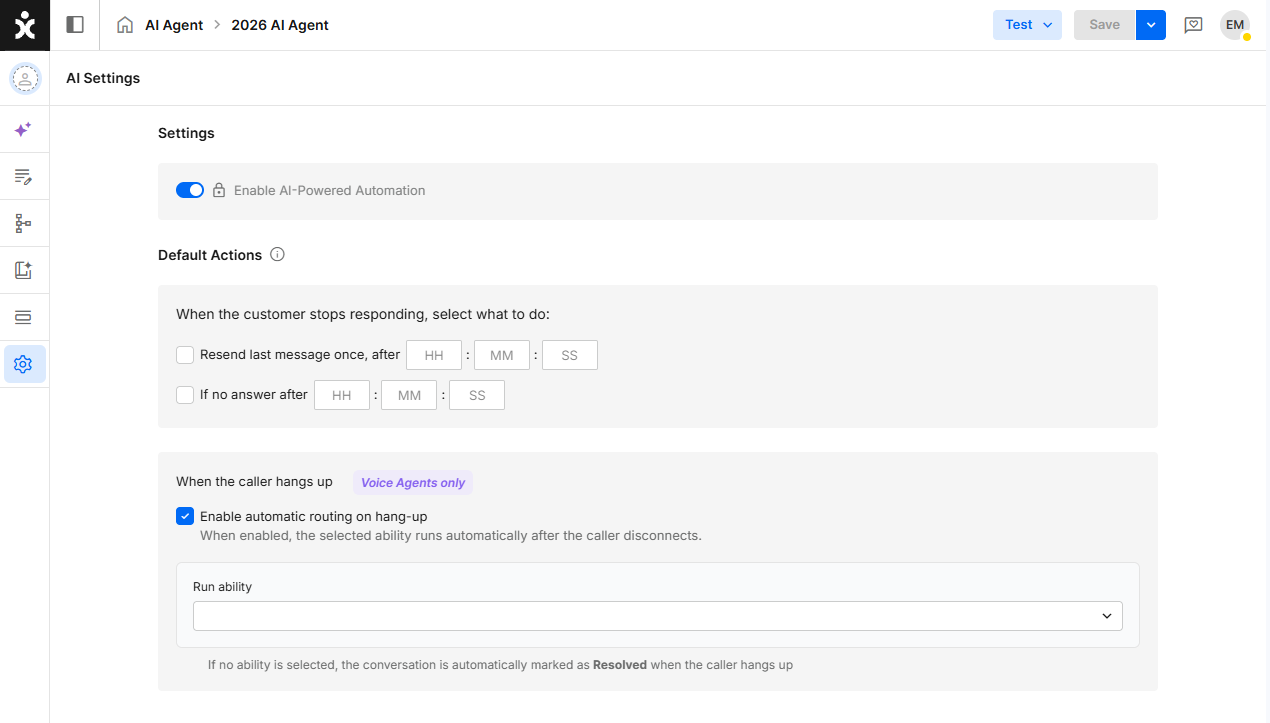
Voice interactions that end when the customer hangs up can now automatically trigger a selected Ability or Step. If no Ability or Step is configured, the conversation status is automatically updated to Resolved.
This enhancement enables organizations to perform post-call actions such as follow-up processing, notifications, data updates, or workflow automation without requiring additional agent intervention.
Click here for the updated guide.
UI/UX
Enhancement – Agent Board UI/UX Improvements
.png)
The Agent Board has been enhanced to improve visibility and navigation. Each automation agent now displays its role and last edited timestamp, making it easier to identify agent purpose and recent activity at a glance.
In addition, the system now remembers each user's preferred board layout. The last selected view (List View or Card View) is automatically restored, reducing repetitive actions and providing a more personalized experience.
CommSite
Enhancement – CommSite Launcher V2
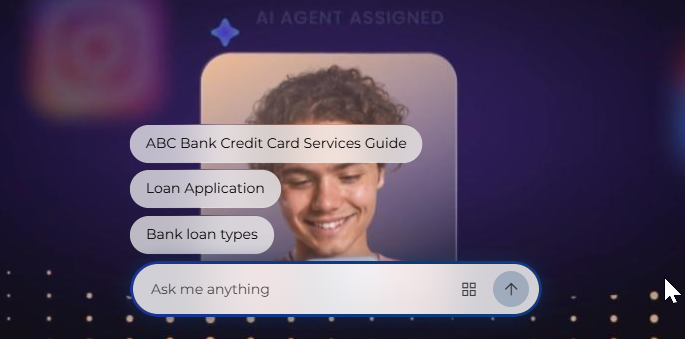
Launcher V2 introduces a more engaging entry experience and greater flexibility for positioning the minimized launcher.
Designers can now choose the launcher's position on the page—left, right, or center (based on the site's language direction)—with center set as the new default. This provides greater flexibility to align the launcher with different website layouts.
Visitors can now see suggested Text Greeting Cards directly above the minimized launcher, allowing them to start a conversation with a single click or open the full welcome screen instead. This reduces friction and helps users reach the right conversation faster while preserving the existing experience for those who prefer it.
As part of the ongoing CommSite modernization effort, the Settings modules have also been refreshed with an updated look and feel.
Click here to learn more about CommSite.
Voice Customers' Requested Feature
Enhancement – Improved AWS Agent Notification
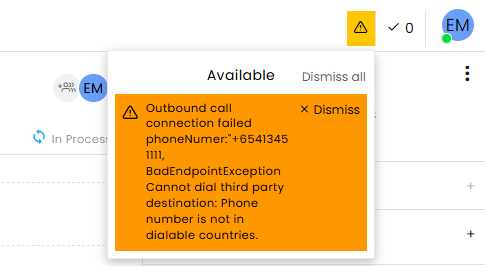
Voice agents now receive detailed AWS error notifications when AWS-related issues occur. Notifications remain visible until dismissed by the agent, helping ensure that important errors are not overlooked.
In addition, all AWS error notifications are now recorded in the Audit Trail Logs, providing improved visibility for troubleshooting, monitoring, and compliance purposes.
Voice Customers' Requested Feature
Enhancement – Optional Call Decline Button
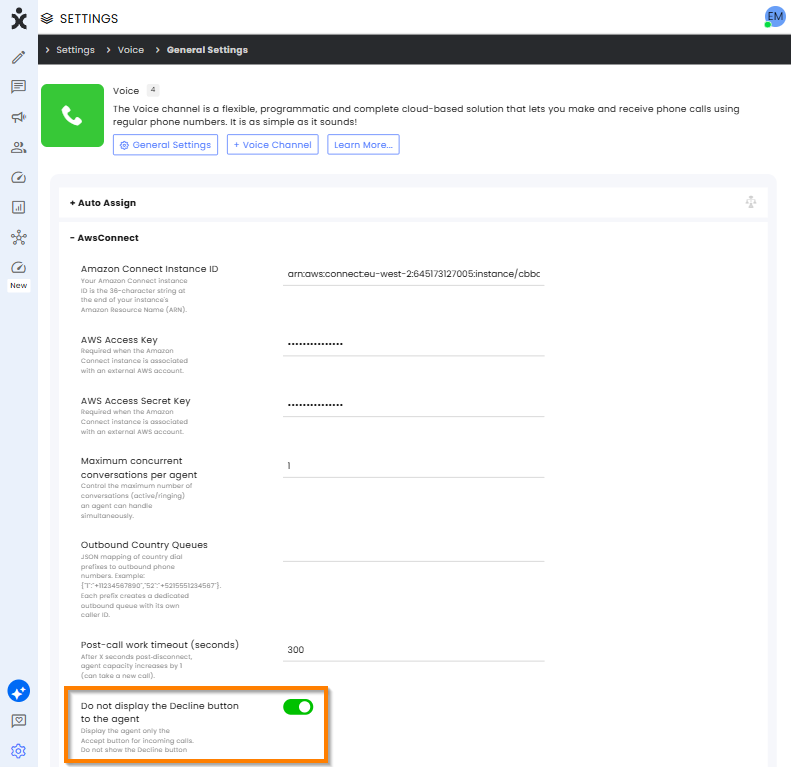
Administrators can now choose to hide the Decline button for incoming AWS Connect calls at either the module or channel level. When enabled, agents will only see the Accept option when a call is offered.
This enhancement helps organizations simplify the agent experience, reduce accidental call rejections, and ensure incoming calls are handled according to operational policies and service-level requirements.
SAP C4C Customers' Requested Feature
Enhancement – Support for SAP C4C Technical User
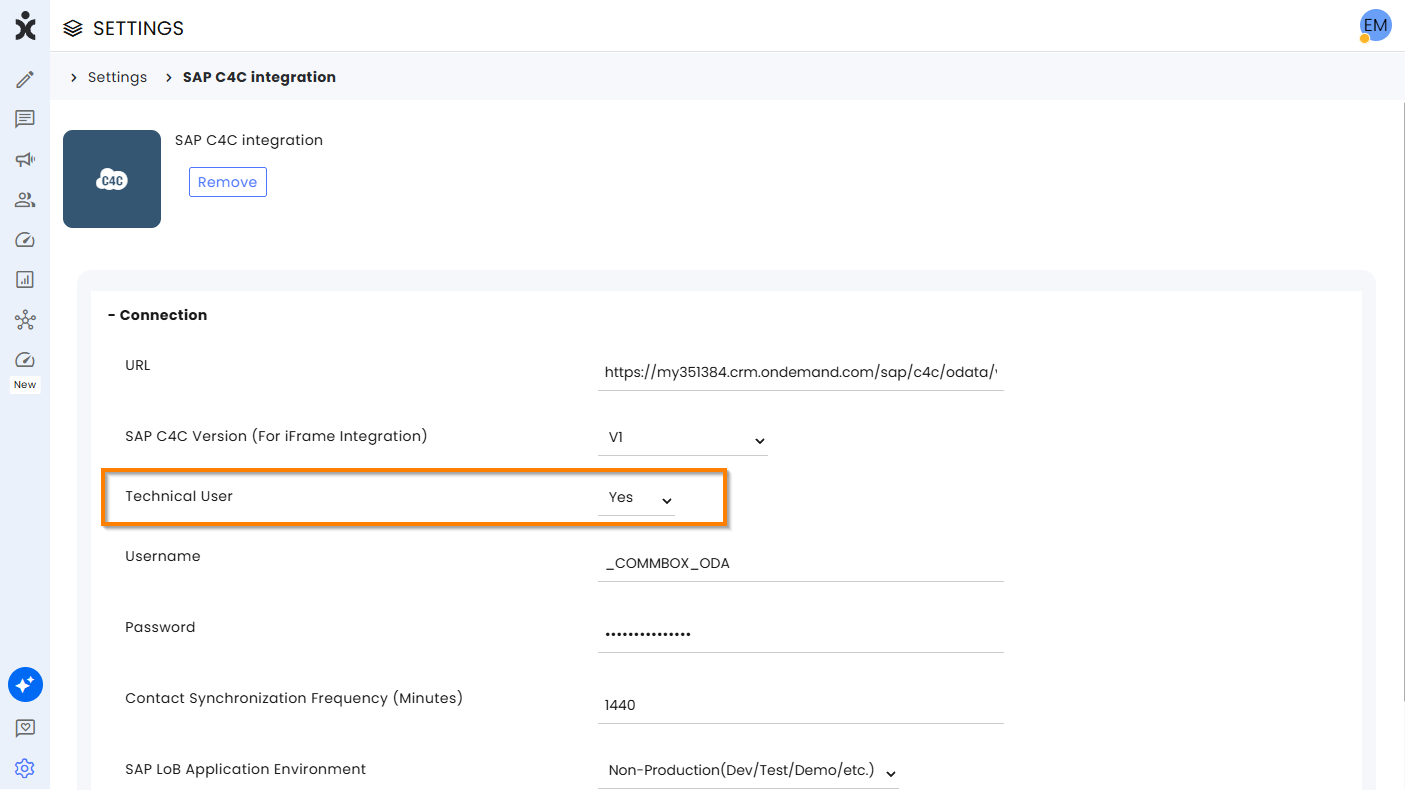
CommBox now supports SAP C4C integrations configured with Technical Users, aligning with SAP's updated authentication model for OData services.
When the Technical User option is enabled, CommBox authenticates directly using Basic Authentication and no longer performs the additional CSRF token retrieval step required by legacy configurations. This simplifies the integration flow, reduces unnecessary API calls, and ensures compatibility with SAP environments that use technical or integration users.
The enhancement enables organizations to adopt SAP's recommended integration approach while maintaining a seamless and reliable connection between CommBox and SAP C4C.