June 2026 Release Notes
Release Date: June 7th, 2026
Release Notes Publication: May 31, 2026
Era Insights
New – User Favorites for Era Insights
.png)
Managers can now save frequently used questions in Era Insights using a new star icon available on submitted questions.
Favorite questions appear in a dedicated Favorites section alongside Open Conversations, available on both the welcome screen and inside active conversations. Selecting a favorite opens a new conversation and automatically resubmits the saved question for a fresh response.
Favorites are private per user, persist across sessions, can be removed at any time, and support an unlimited number of saved questions.
Click here for the updated guide.
Customer Page UI
New – Customer Page Management
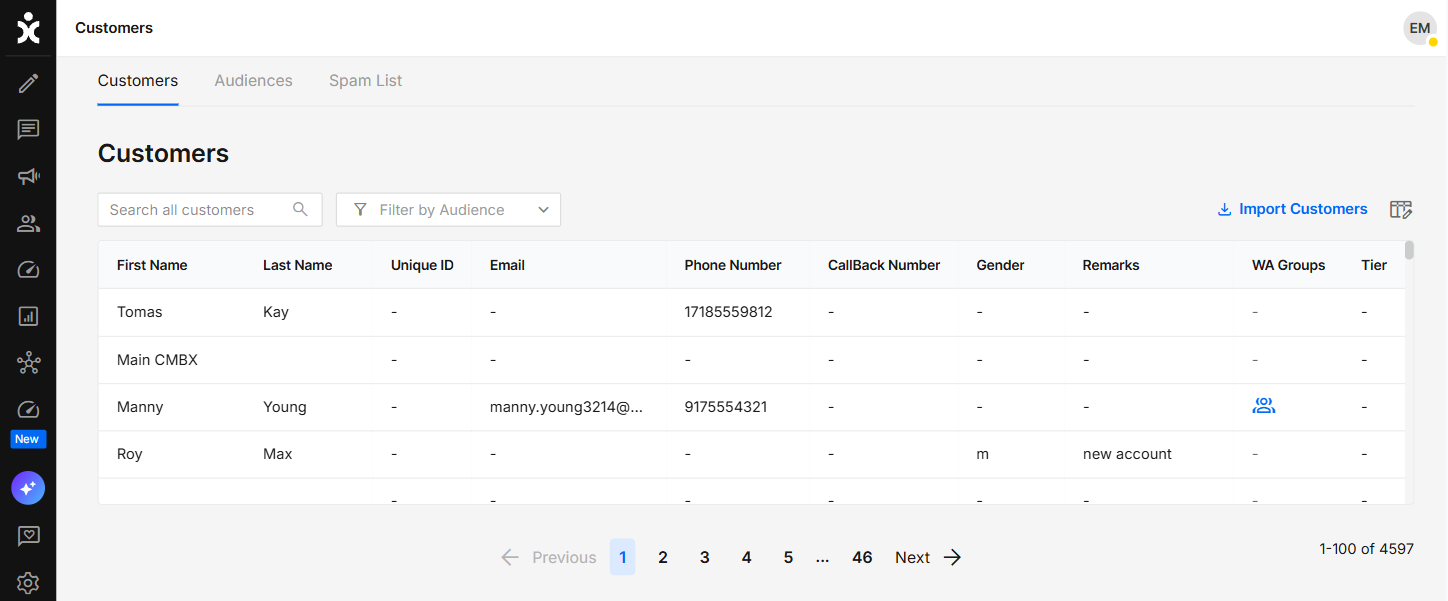
The Customers page has been updated with a new UI and improved usability of customer data management.
New capabilities include:
- Filtering customers by audience
- Display a WhatsApp Group indication column for customers participating in WhatsApp groups
- Open customer conversation history directly from the Customers page
- Import customer lists into dedicated customer groups for easier audience management
Click here to learn more about this topic.
AI Agent
New – Actionable Instructions for AI Agents
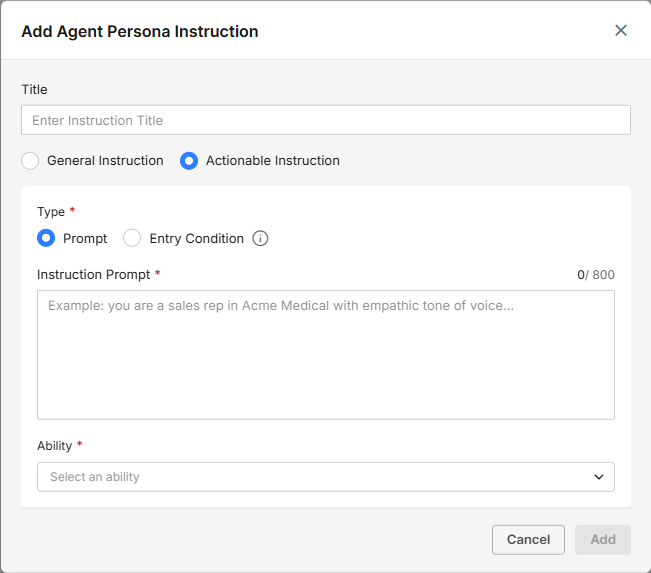
Designers can now define actionable instructions for AI Agents by linking a specific instruction to a selected ability, helping ensure predictable and consistent outcomes for predefined scenarios.
Instructions can be triggered either by an Instruction Prompt or by an Entry Condition, which is based on existing conversation or customer data, allowing the AI Agent to automatically activate the relevant ability when matching conditions are met.
Click here for the updated guide.
API Customer Satisfaction Real-Time Dashboard Customers' Requested Feature
New – External Surveys API
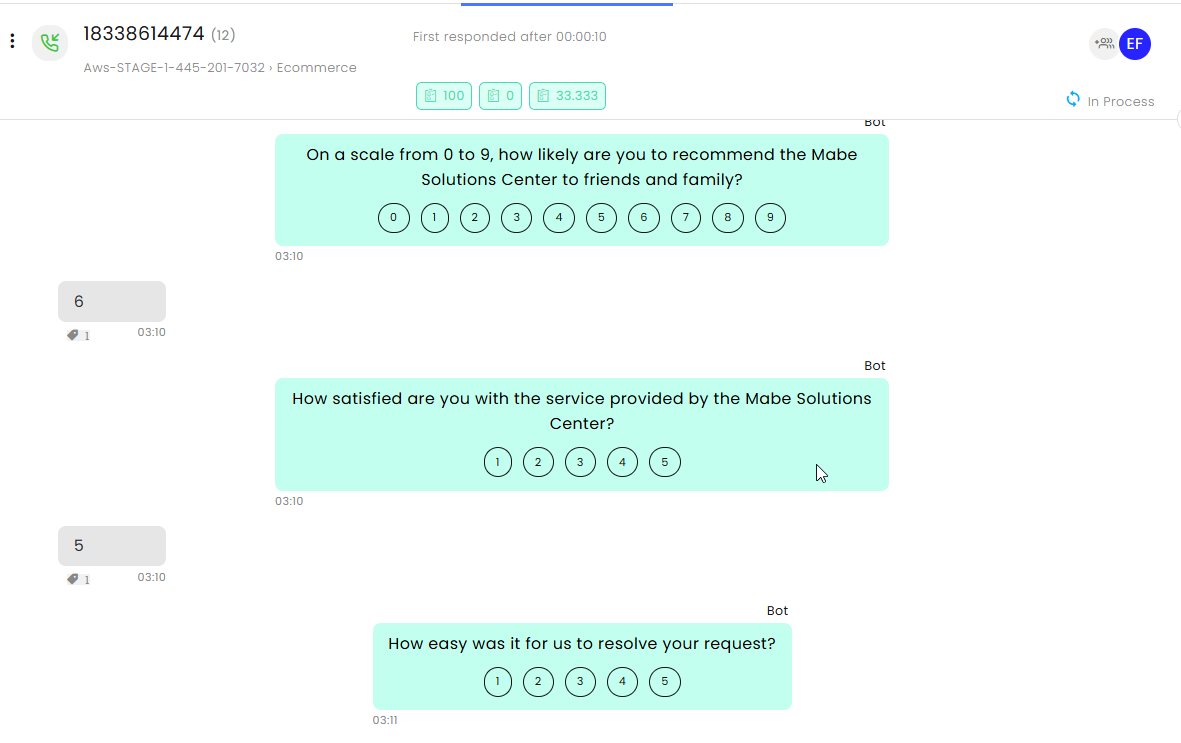
Organizations can now push external voice survey results directly into CommBox conversations via a new REST API endpoint: POST /objects/{objectId}/survey
The API is called once per question, immediately after the customer answers. Each call includes the question text, the full list of possible answers, and the customer's selected answer. CommBox automatically derives a normalized score, records the question and answer in the conversation timeline, applies satisfaction tags, and updates reports and dashboards in real time.
Results are visible in the conversation satisfaction score, in Insights > Satisfaction Report, and in the Real-Time Dashboard, with no additional UI configuration required.
SLA Customers' Requested Feature
New – Next Business Day SLA Window
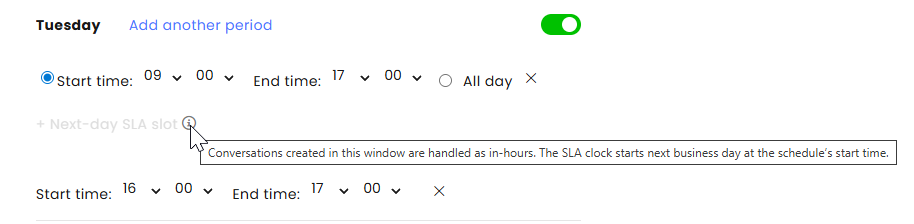
A new “Next Business Day SLA” configuration is now available in the Business Hours module, enabling organizations to define a late-day window that is treated as the next business day for SLA calculations. This helps ensure that conversations initiated near the end of the workday are not unfairly marked as SLA breaches, improving SLA tracking accuracy during end-of-day traffic peaks.
Note: The configuration allows defining a single SLA window per business day, strictly within existing business hours.
Click here for the updated guide.
WhatsApp Customers' Requested Feature
New – Named Parameters for WhatsApp Templates
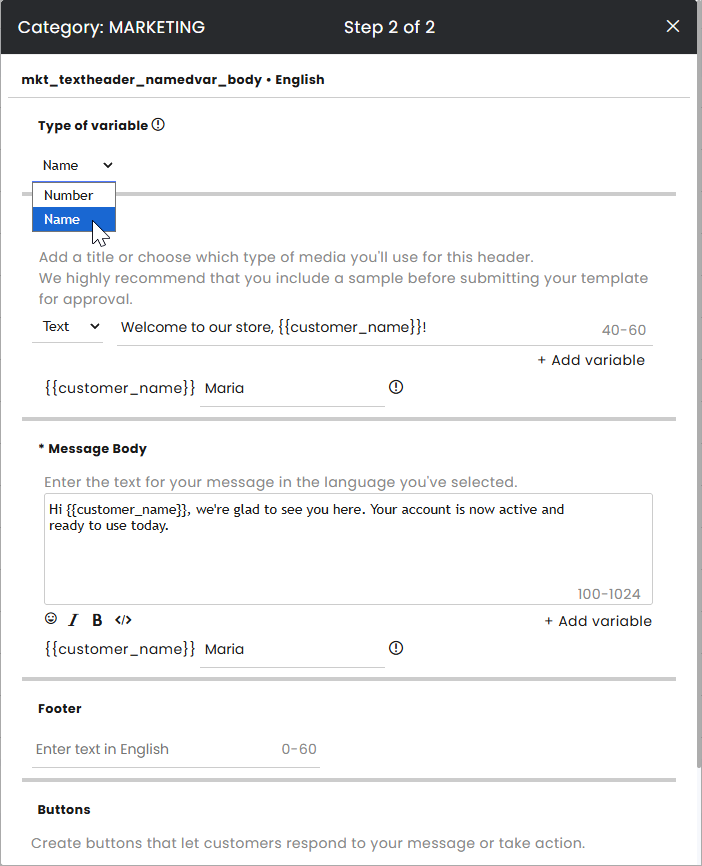
Named parameters are now supported in WhatsApp template creation, allowing users to define variables using meaningful names instead of numbered placeholders.
This improves template clarity and reduces configuration errors by making it easier to understand what each variable represents. It also simplifies maintenance and supports better alignment with CRM and automation workflows.
Previously, WhatsApp templates used numbered placeholders such as {{1}}, {{2}}, {{3}}. With this update, users can now choose between Number mode (e.g., {{1}}, {{2}}) and Name mode (e.g., {{customer_name}}, {{company_name}}) when creating templates.
Note:
- Templates can contain only one type of variable.
- Template name variables must contain small letters only
- Templates can’t start with a variable
API
New – API: Custom Request ID for Log Correlation
.png)
API consumers can now add a custom request identifier to customer-facing API requests, making it easier to trace and correlate operations across external systems and CommBox logs.
The request ID can be provided using a configurable HTTP header, which defaults to X-Customer-Request-Id, or alternatively through the customerRequestId request parameter. When present, the value is automatically appended to all log entries generated during the request lifecycle.
Each brand can configure its preferred header name from Settings > API > General > Custom Header Name.
This enhancement improves troubleshooting, debugging, and cross-system request tracking while remaining fully backward-compatible with existing integrations.
Click here for the updated guide.
Campaigns Customers' Requested Feature
New – Editing Dynamic Audiences in Campaigns
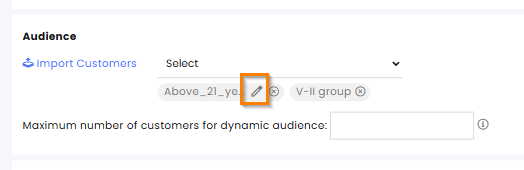
Campaign managers can now edit selected dynamic audiences directly from the compose section before sending a campaign. Clicking the edit icon opens a dialog with the audience’s filter parameters, allowing users to review and adjust the audience without leaving the campaign flow.
This improves control and accuracy, helping ensure campaigns are sent to the right audience and reducing the risk of incorrect targeting or having to restart campaign setup.
Users can update the audience criteria and choose to either:
- Save changes for the current campaign only, or
- Save and apply the updated filters as the audience definition.
Note: When selecting a filtered audience that includes WhatsApp groups, the campaign message is sent to the WhatsApp groups themselves, not to the individual users inside those groups.
Click here for the updated user guide.
WhatsApp Groups Customers' Requested Feature
Enhancement – Updating Admins in WhatsApp Groups
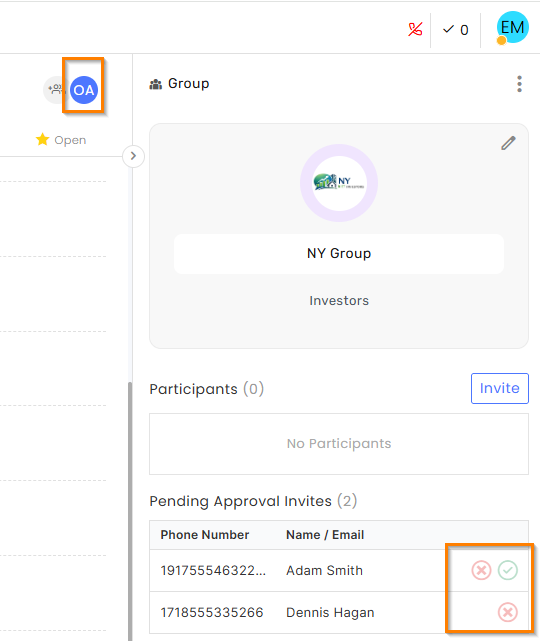
WhatsApp Group admins can now be easily switched by clicking the agent’s initials icon, making group management faster and simplifying admin reassignment when team responsibilities change.
Only the currently assigned agent is the group admin who can approve or reject new member requests, reset invite links, remove members, or edit group settings. In addition, when a group conversation is resolved and later reopened, it is automatically reassigned to the last group admin assigned before resolution, ensuring continuity and smoother ongoing management.
Click here for the updated guide.
WhatsApp Groups
Enhancement – Removing Members from WhatsApp Groups
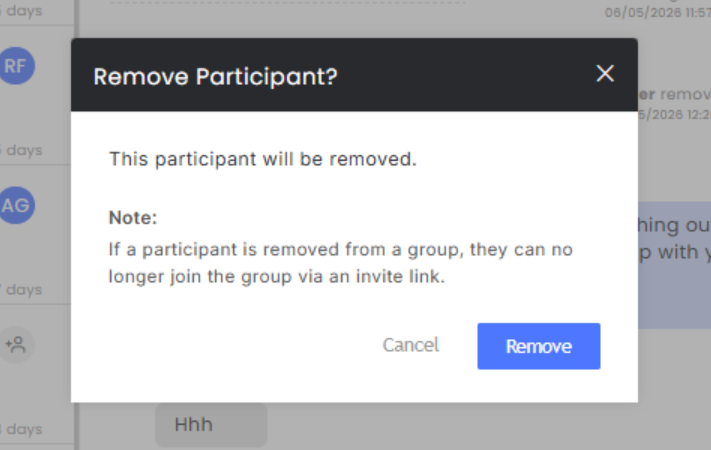
WhatsApp Group admins can now drop a participant from their group by hovering over the listed member and clicking the X. A confirmation dialog box will then open before the member is removed.
Note: Unique to business groups
Once the admin removes a member from the group, that member can no longer join via an invite link.
Inbox UI
Enhancement – Typing Indicator in Inbox
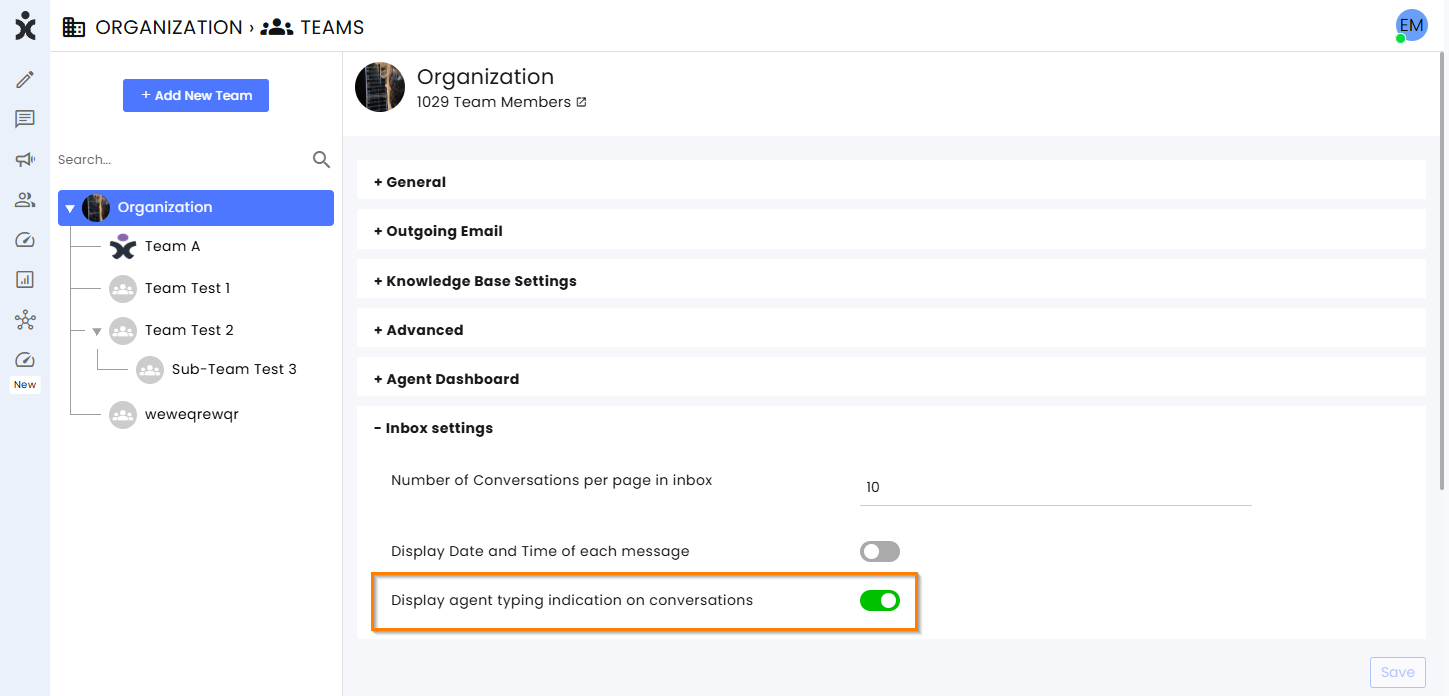
CommBox is introducing a new typing indicator that improves real-time communication clarity between agents and participants.
When an agent is actively typing a message, a typing indicator will now be displayed to all other viewers, both in the conversation list and within the open conversation view. This provides clear visibility that a response is in progress and improves responsiveness across the system.
The indicator is supported across all conversational channels, including WhatsApp group conversations, and is triggered only by active typing behavior and not by the presence of unsent text in the reply box.
To activate this enhancement, navigate to Settings > Organization (at the side bar), expand the Inbox settings, and toggle on Display agent typing indication on conversations.
Knowledge Base Crawler
Enhancement – Custom Headers in Knowledge Base Crawling
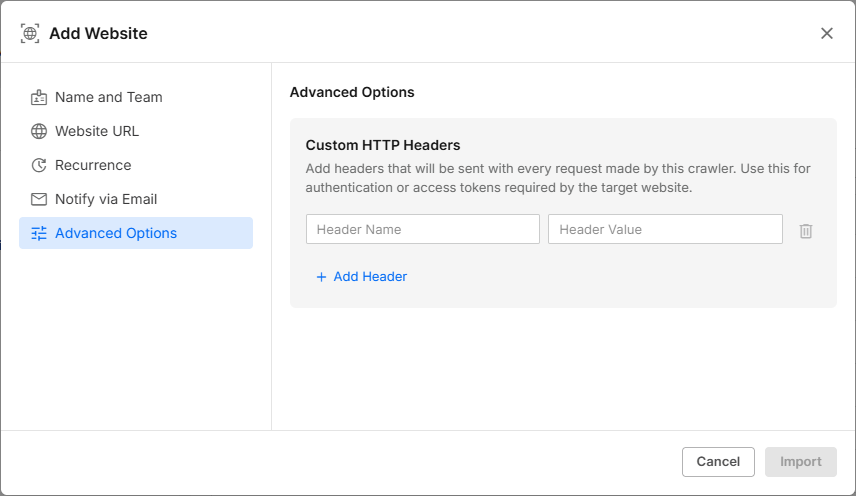
Content managers can now add Custom HTTP headers to crawling requests, helping ensure that crawls are not blocked by target websites due to security or bot-protection mechanisms.
This enhancement allows users to define one or more key–value HTTP header pairs that will be included in every request during the crawling process. It improves compatibility with websites that enforce request validation or require specific headers for access.
With this capability, previously restricted websites can now be successfully crawled, including platforms such as Shopify that require signed authentication headers (e.g., Signature, Signature-Input, and Signature-Agent) as part of their validation process.
Theme Channels Instagram Telegram Customers' Requested Feature
Enhancement – AI Assistant Settings for Additional Channels
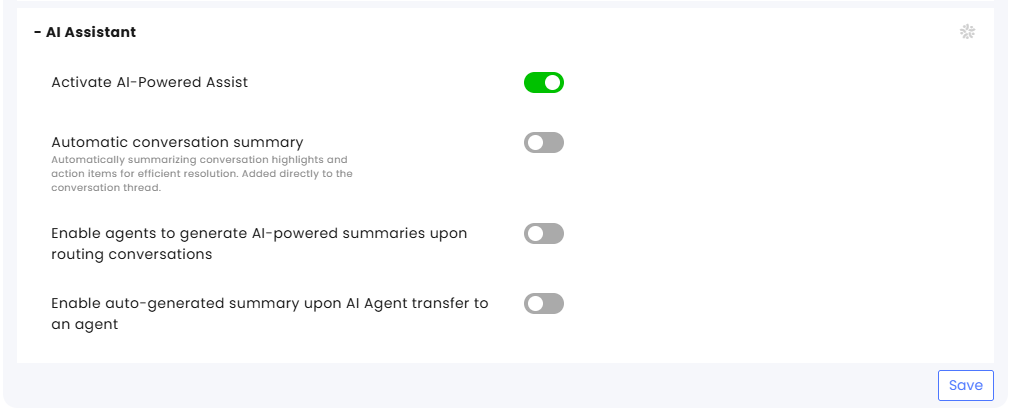
AI Assistant settings are now available for Theme Channels, Instagram, and Telegram, enabling consistent AI capabilities across additional customer channels and improving conversation handling and context continuity.
This update extends AI automation and summarization to additional touchpoints, helping teams work more efficiently and gain better conversation insights.
The following AI capabilities can now be configured directly from these channel types:
- Activate AI-Powered Assist
- Automatic conversation summary
- Enable agents to generate AI-powered summaries upon routing conversations
- Enable auto-generated summary upon AI Agent transfer to an agent
Note:
When a conversation is transferred into a Theme Channel with AI Assist enabled, the Theme Channel configuration overrides the source channel’s AI Assistant settings.
Webhooks
Enhancement – Dynamic Filters for Webhooks Failed Events
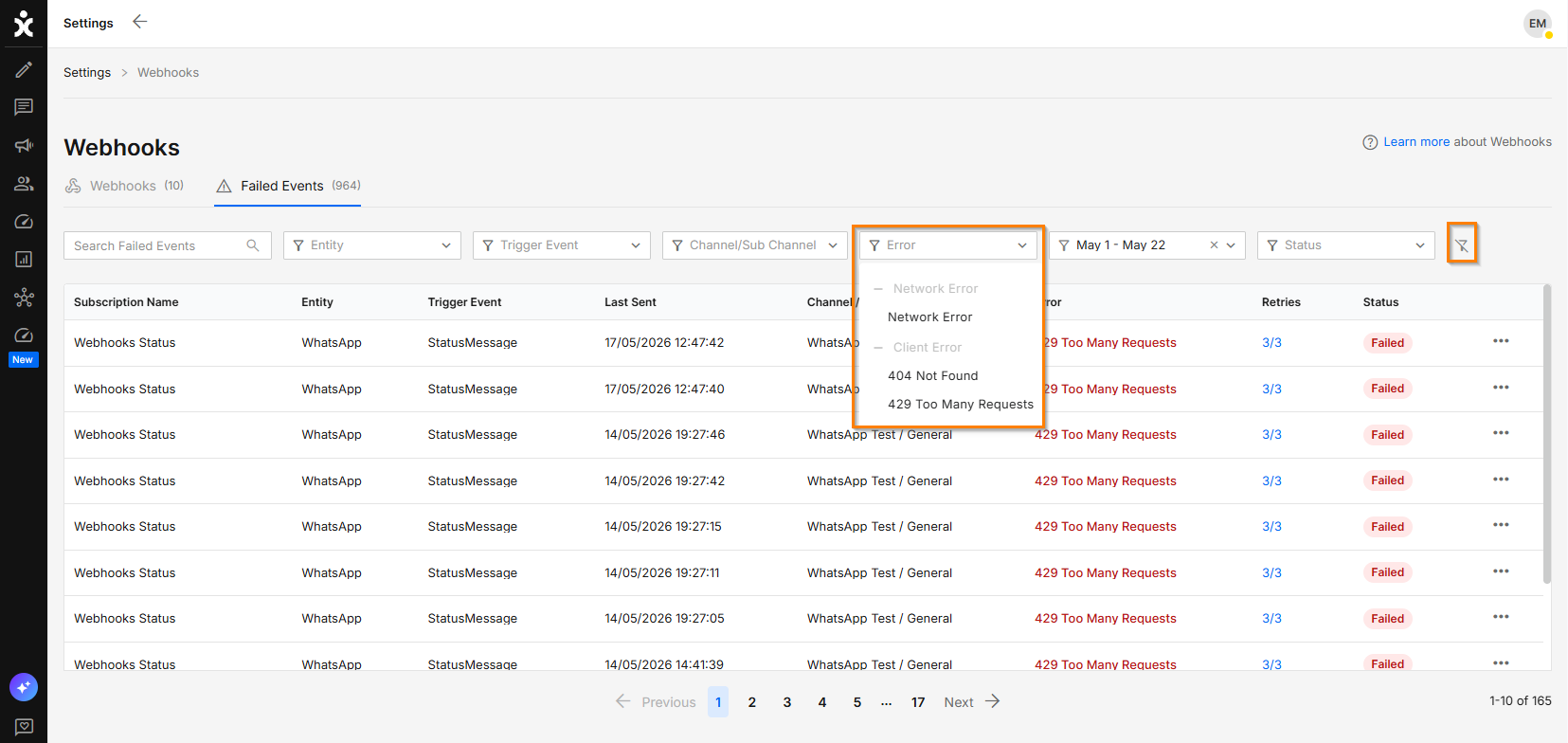
The Failed Events view in Webhooks now includes dynamic filters that display only the filtering options relevant to the selected criteria. Date and time filters are presented contextually, including preset ranges and manual date-time inputs when applicable, creating a cleaner, more focused filtering experience.
This improvement simplifies event investigation, reduces unnecessary filter options, and helps users locate relevant failed webhook events more efficiently.
Inbox Customers' Requested Feature
Enhancement – Sort Options in Customer Conversation History
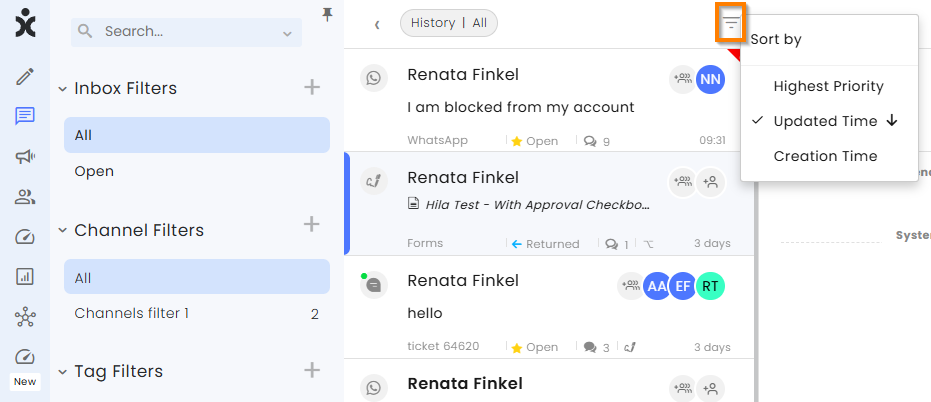
Agents can now sort conversations within the Customer Conversation History view, making it easier to locate the most relevant customer interactions.
A new sort option has been added to the conversation list in the customer history screen, enabling users to sort conversations by:
- Priority
- Updated time
- Creation time
The available sorting options align with those used in other conversation lists in the Inbox for a more consistent user experience.