May 2026 Release Notes
Release Date: May 5, 2026
Release Notes Publication: April 30th, 2026
AI
New – The Next Generation AI Agent (Beta)
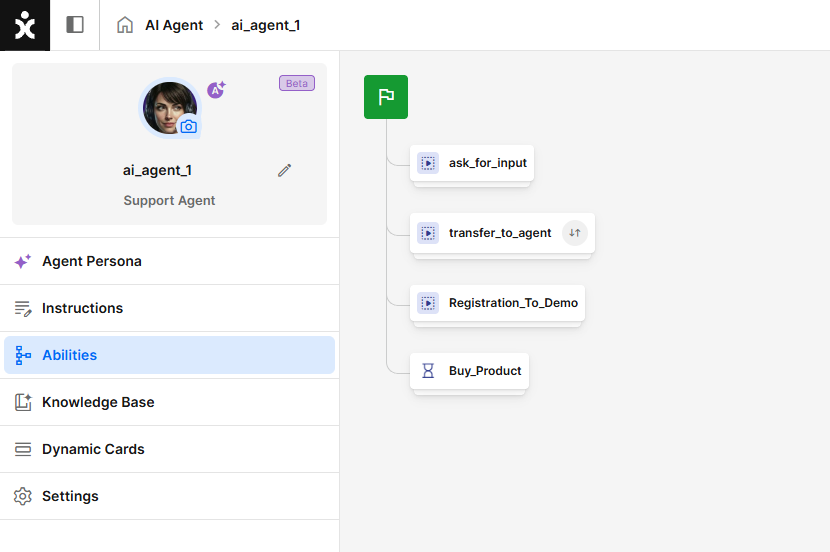
CommBox introduces the next generation of AI Agent (Beta), enabling dynamic, goal-driven customer interactions powered by autonomous reasoning. This enables the agent to independently plan, decide, and act using knowledge, tools, instructions, and contextual understanding, helping organizations deliver focused, guided, and brand-aligned conversations at scale.
CommBox now supports three types of automation agents:
- AI Agent (Beta): Autonomous reasoning, goal-driven responses using knowledge, tools, instructions, and context
- AI Chatbot: Deterministic, flow-based chatbot enhanced with AI for intent detection and retrieval-augmented responses, using structured knowledge and instructions
- Chatbot: Deterministic, flow-based automation using intents, rules, and APIs
The new AI Agents operate using Abilities. These are self-contained, reusable components that function either as mini-flows or as discrete tools, such as API-based actions, to execute specific tasks. Abilities can be used out of the box or customized to meet specific business needs.
Click here to learn more about this topic.
WhatsApp Customers' Requested Feature
New – WhatsApp Groups Support
.png)
CommBox now supports WhatsApp Groups, enabling agents and customers to communicate in shared group conversations directly from the platform. This reduces back-and-forth by aligning all stakeholders in real time.
All associated agents can participate in multi-user discussions, maintain full conversation context, and collaborate more effectively when engaging with customers. All group interactions are visible in real time and stored in a centralized conversation history, ensuring complete context and continuity across the discussion.
Click here for the user guide covering the new module and the Meta requirements.
WhatsApp Audiences Customers' Requested Feature
New – WhatsApp Groups Audience Support
.png)
Campaign managers and marketers can now include WhatsApp Groups as a filter when creating or editing audiences, enabling more precise targeting based on group interactions.
When adding this filter, users can search and select WhatsApp groups from a dropdown and choose how to define the audience using one of two modes:
- Group conversations – targets the selected WhatsApp groups directly, enabling campaign messages to be sent to them as a group.
- Customers within the group – targets individual customers who are members of the selected WhatsApp groups.
This enhancement enables more relevant campaign targeting, improves segmentation accuracy, and supports more effective engagement with both groups and individual customers.
Click here for the updated user guide.
SLA Customers' Requested Feature
New – Business Day SLA Notification
.png)
Managers can now define an additional SLA type calculated on business days rather than seconds. This helps agents easily identify conversations that have breached business-day SLA thresholds.
Breached conversations are clearly highlighted with a red background at the start of the business day, enabling agents to quickly prioritize overdue items and improve overall SLA compliance.
Click here for the updated guide.
Automation Agents UI
New – Card View for AI Agents
.png)
Agents can now be displayed in a card-based layout within the Automation Hub, providing a more visual and intuitive browsing experience. The Card View is now the default, while the existing List View remains available.
Each card includes key agent details such as avatar, name, and status indicators (AI active, knowledge updating, inactive state), along with the actions menu.
Users can switch between Card and List views at any time, with their preference saved for the duration of the session.
Webhooks WhatsApp Customers' Requested Feature
Enhancement – Webhook for WhatsApp Message Status Tracking
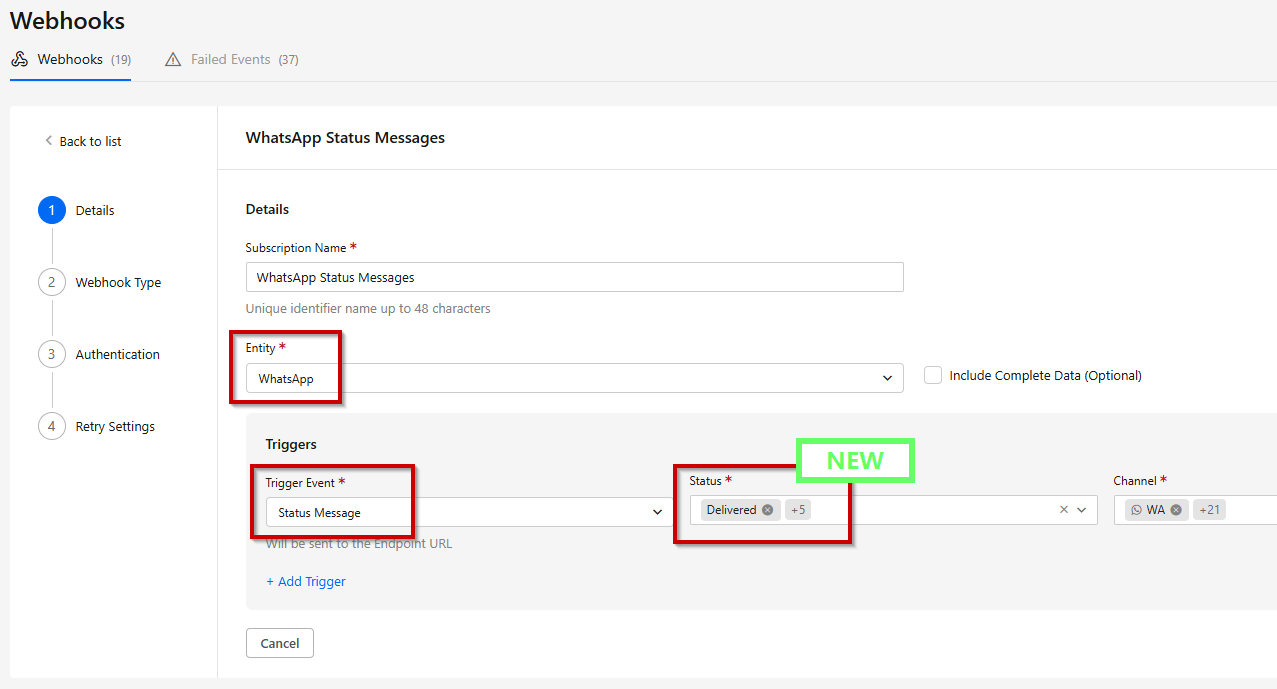
Organizations can now subscribe to WhatsApp message status events, enabling accurate tracking of messages that were sent, delivered, read, and responded to.
This feature works without requiring an object, allowing you to receive webhook events for WhatsApp messages sent via API.
Click here for the updated user guide.
Webhooks Customers' Requested Feature
Enhancement – Webhooks Event Search Filtering
.png)
Developers can now easily find and analyze failed webhook events using new filtering capabilities in the Webhook module. Filters include entity, trigger type, time range, communication channel type, and more. This improves troubleshooting efficiency and enables faster root-cause analysis by quickly narrowing down relevant events.
API Chat Customers' Requested Feature
Enhancement – File Attachment in Chat Messages via API
Developers can use the POST /streams/{STREAM_ID}/objects/{OBJECT_ID}/child API to attach a file to a chat message (Chat child object) within a conversation, enabling richer interactions by allowing documents, images, or other files to be shared programmatically.
For additional details, refer to the API documentation.