2026 Release Notes
Release Date: November 29, 2026
Release Notes Publication: November 22, 2026
Voice UI
New - Call Recording Bar
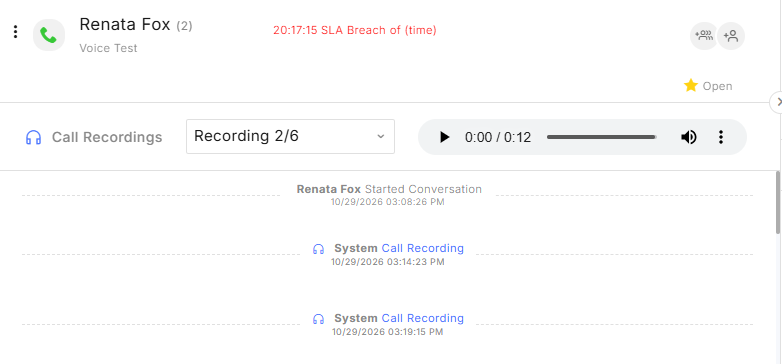
Call recordings are now available in a fixed bar below the conversation header, giving agents quick access without scrolling through messages. The player stays visible as agents browse the conversation.
When a call includes multiple recordings, agents can switch between them using a dropdown. The player includes playback controls, download, and playback speed options.
AI Agent Eva
New - AI Agent Performance Dashboard
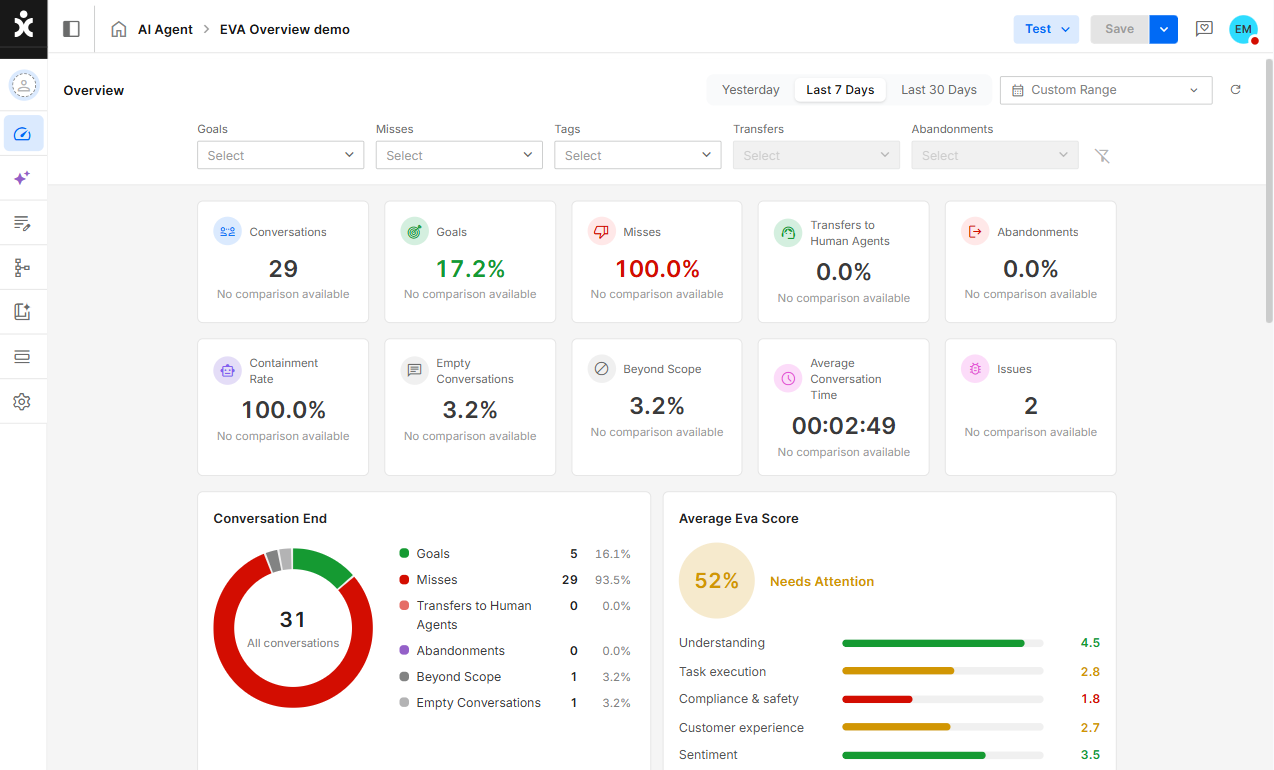
AI Agent administrators and designers can now access a dedicated Overview dashboard to monitor and analyze individual AI Agent performance.
The dashboard provides insights into each AI Agent's activity and performance, helping organizations evaluate effectiveness, identify areas for improvement, and make data-driven decisions to optimize their AI Agents.
Click here to learn more about Eva’s Overview dashboard.
Eva Issues Board
New - Automatic Issue Creation by Eva
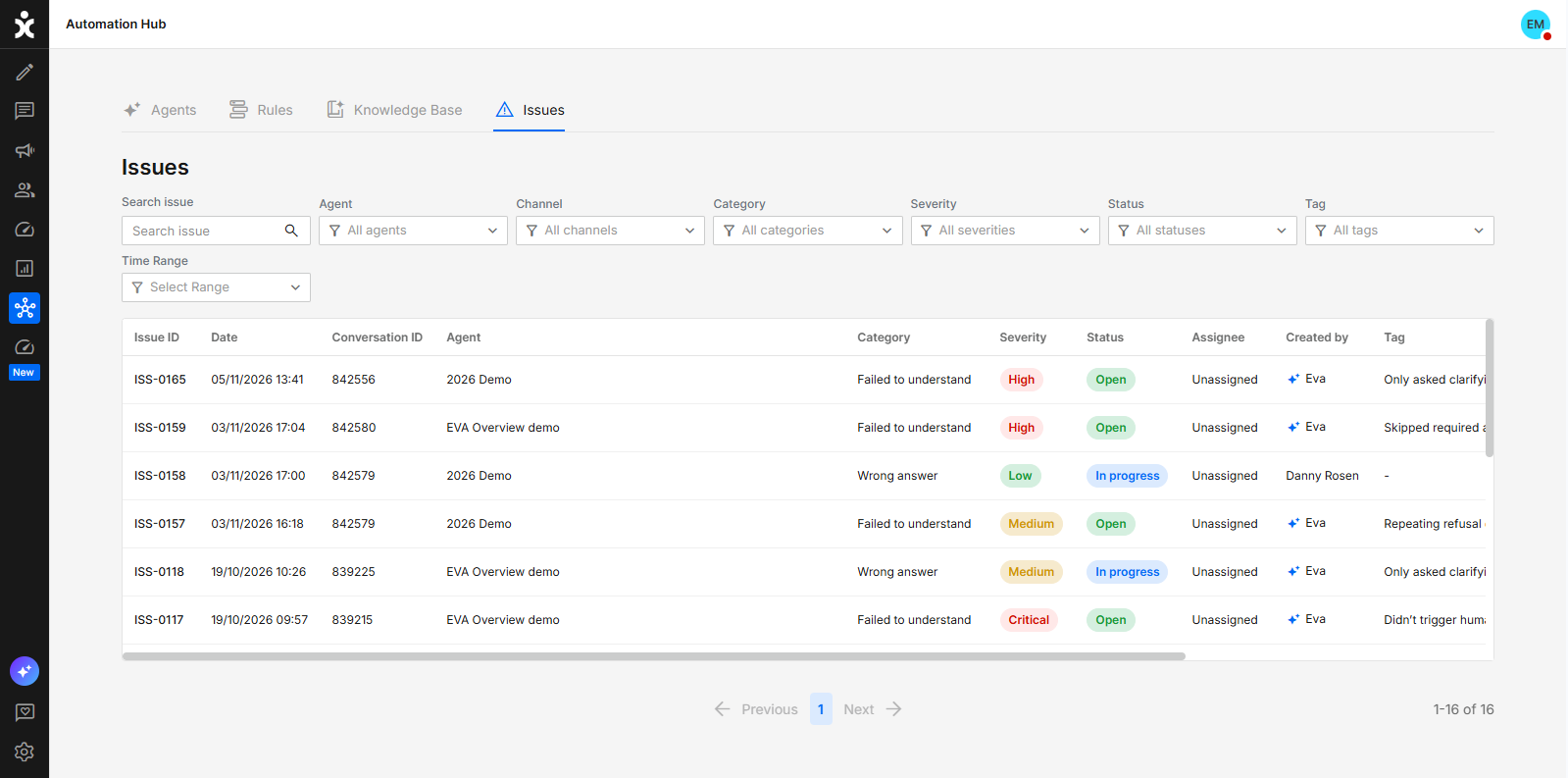
Eva can now automatically create issues when it identifies problems in AI Agent conversations. Each issue includes an explanation, evaluation reasoning, and supporting quotes from the conversation, with Eva identified as its creator.
Eva associates findings with tags in a dedicated Eva-Misses group, reusing existing tags where appropriate. If an open issue already uses the same tag, Eva does not create another issue for that tag. Users can also filter the issues list by tag to review related findings.
This helps teams turn conversation evaluations into actionable improvements while reducing manual review.
Click here for the updated guide.
Security Flow Builder Integrations Customers’ Requested Feature
New - Centralized Certificate Management
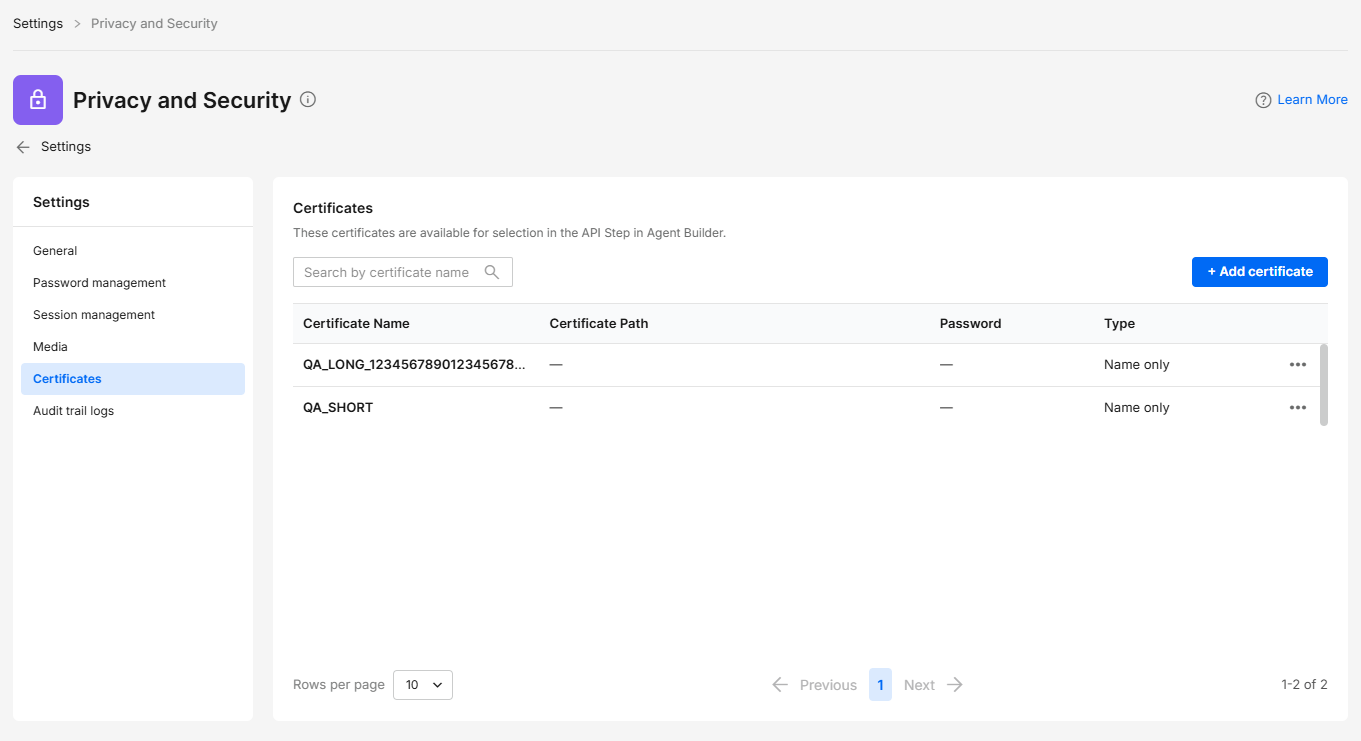
Admins can now manage API authentication certificates in one location to reduce repetitive configuration and help prevent integration errors. Certificates can be reused across multiple Flow Builder API steps and updated centrally, without editing each step individually.
To manage certificates, navigate to Settings > Privacy & Security > Certificates. In the Flow Builder, use the new Select Certificate dropdown in a REST, SOAP, or RAW API step to select a saved certificate.
Click here for the updated user guide.
AI Agents KB API Customers’ Requested Feature
New - Knowledge Base Management API
Organizations can now manage their AI Knowledge Base through the CommBox API, connecting external content sources and reducing manual updates. This allows users across the organization to keep content up to date without relying on the design and automation teams.
The new APIs support uploading and deleting files, listing and searching the organization's Knowledge Base content, and attaching or detaching files and folders from an AI Agent’s custom Knowledge Base. Integrations can also track processing progress and publish Knowledge Base changes independently, without publishing changes to the agent’s flow.
POST /kb/updateadds files to the main (General) knowledge base and deletes AI items.POST /kb/agents/{agentId}/updateattaches or detaches items on an agent's custom knowledge base and builds it as a draft.POST /kb/agents/{agentId}/publishpublishes the agent's knowledge-base draft (the flow itself is not published).GET /kb/tasks/{taskId}follows the background work of the updating APIs
Click here to learn more about this capability.
Voice AI Agents API
New - Outbound Calls with Voice AI Agents
Organizations can now initiate outbound calls with a Voice AI Agent through the CommBox API, helping teams reach customers without manually placing each call. This capability enables external systems and business workflows to trigger calls for appointment confirmations, service follow-ups, and customer updates.
The API calls the customer through the brand’s SIP voice channel, and the configured Voice AI Agent handles the interaction. A conversation is created on the channel for tracking and review.
Click here to learn more about this API in the Developer Center
Voice Integrations AI Assist
Enhancement - AI Summaries and CRM Transfer on Voice Channels
Voice conversations now support AI-generated summaries and automatic transfer of transcripts and summaries to your CRM, helping teams keep customer records complete and reduce manual documentation.
When enabled, the AI summary is generated after transcription completes and covers all transcribed recordings in the conversation. Transcripts and summaries are transferred independently as each becomes available, including when the conversation has already been resolved.
Supported integrations include Salesforce, Dynamics 365, SAP C4C, Oracle Service Cloud, Priority ERP, and SysAid. Enable transcription on the voice channel to access the transcript and summary transfer options in the relevant CRM module settings. Both transfer options are off by default.
WhatsApp Campaigns Customers' Requested Feature
Enhancement - Personalized Link in WhatsApp Campaigns
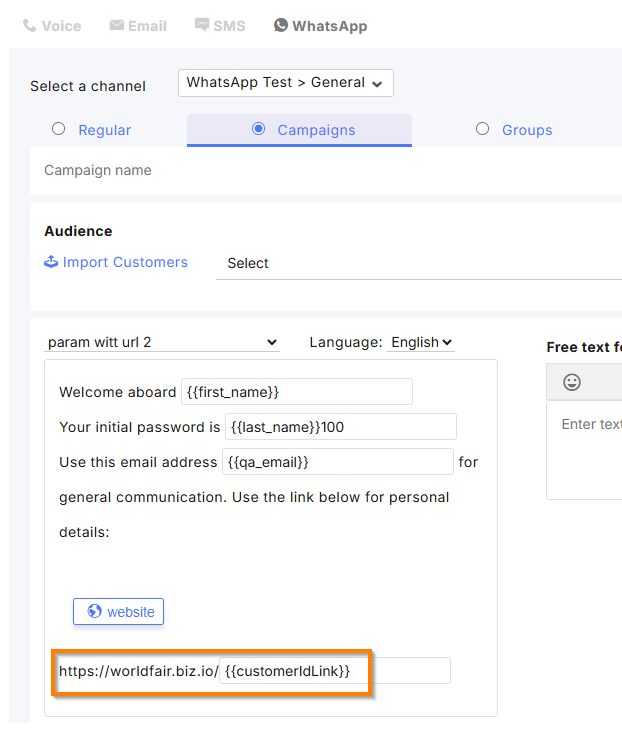
Campaign managers can now send each recipient a personalized link through a WhatsApp template’s dynamic URL button, making it easier to direct customers to their own registration page, guest portal, or other personalized destination.
When preparing a campaign, map a column from the uploaded audience file to the button’s URL variable. CommBox uses each recipient’s value to complete the link, allowing personalized buttons within a single campaign.
ERA AI AI Agents
Enhancement - Era AI Credit Management
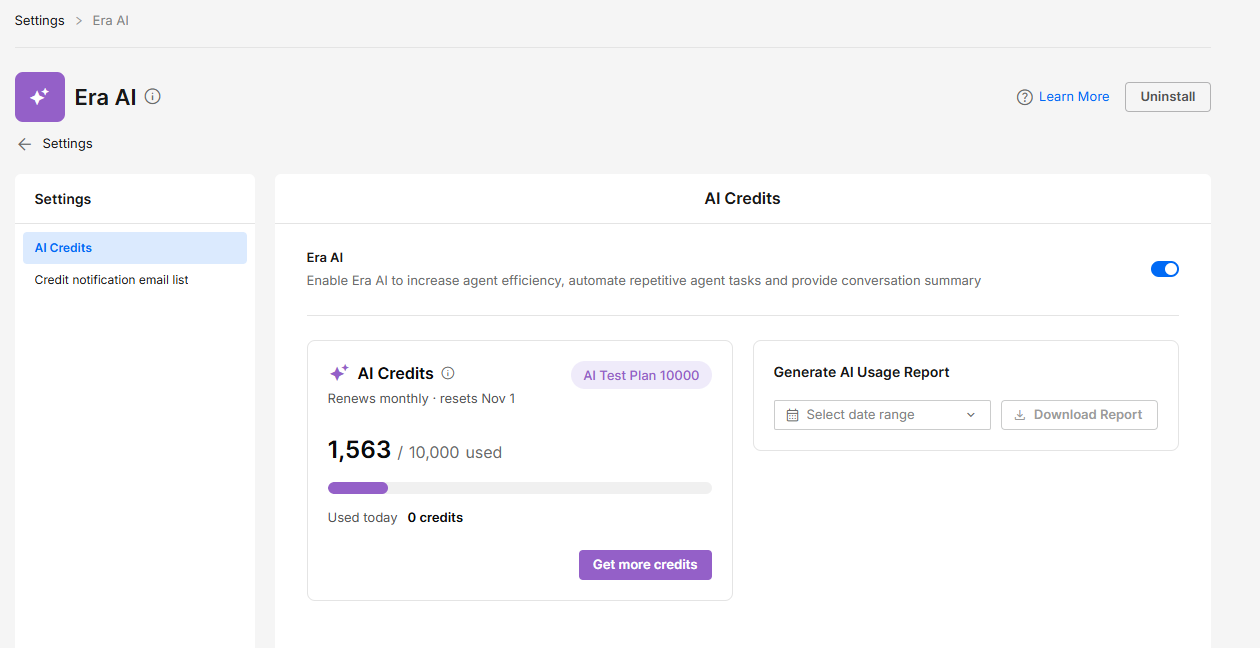
CommBox is now expanding ERA AI credit monitoring and management options, helping organizations plan their usage and identify when their balance is running low.
The AI Usage Report now supports custom date ranges and displays credit package details and the remaining balance. Visual indicators make it easier to identify low or exhausted balances. Organizations can also receive automatic email notifications when their balance reaches predefined thresholds. To manage additional recipients, open the Credit notification email list tab under Settings > ERA AI.
Monthly credit packages now renew based on each package’s start date, instead of resetting at the end of each calendar month. Annual credit packages are also available starting with this release. Contact your Customer Success Manager for details.
Click here for the updated guide.
Eva
Enhancement - Eva Evaluation Instructions
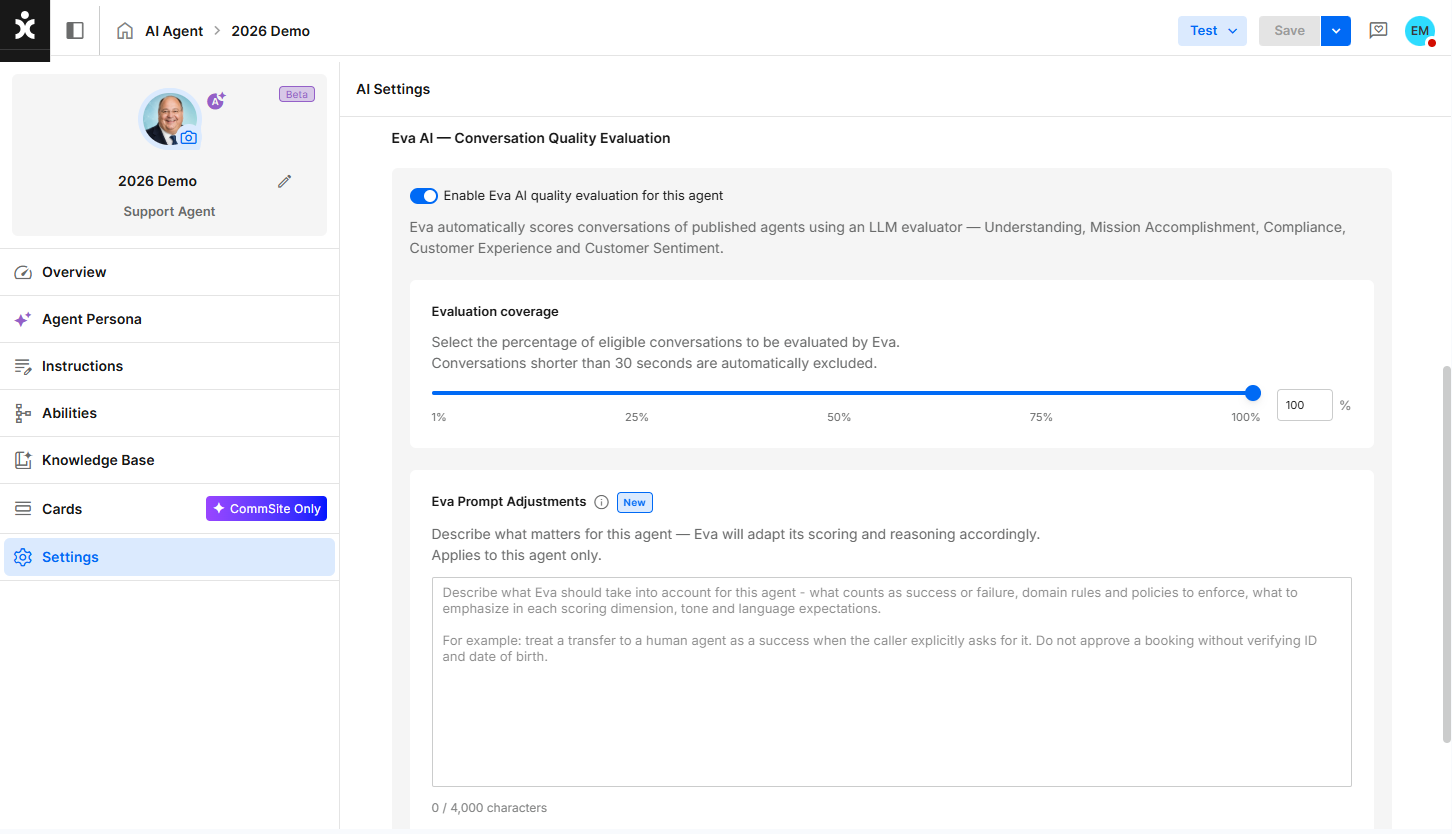
AI Agent designers can now adjust Eva’s evaluation instructions to define what success looks like for each AI Agent. This helps Eva assess conversations against the business’s goals, such as booking an appointment without transferring to a human agent or providing specific information to the customer.
In AI Agent Settings, use the new Eva Prompt Adjustments field within Eva AI - Conversation Quality Evaluation to describe business goals and success criteria.
The instructions apply only to that AI Agent and help Eva align its scores and reasoning with the business’s priorities, making it easier to identify gaps and focus improvements on the outcomes that matter.
Click here to learn more about Eva.
WhatsApp UI
Enhancement - WhatsApp V4 and New UI
CommBox now features a redesigned user interface for WhatsApp UI, providing a more intuitive, streamlined experience for managing WhatsApp channels, accounts, and message templates.
This new interface now allows users to easily preview their templates and see how customers will receive them. Duplicating templates is also available, making it easier to reuse preexisting ones.
This update also introduces support for Meta's V4 Embedded Signup, providing an updated onboarding experience for connecting WhatsApp Business accounts to CommBox.
Era Insights Pulse
Enhancement - Era Insights Charts and Usability
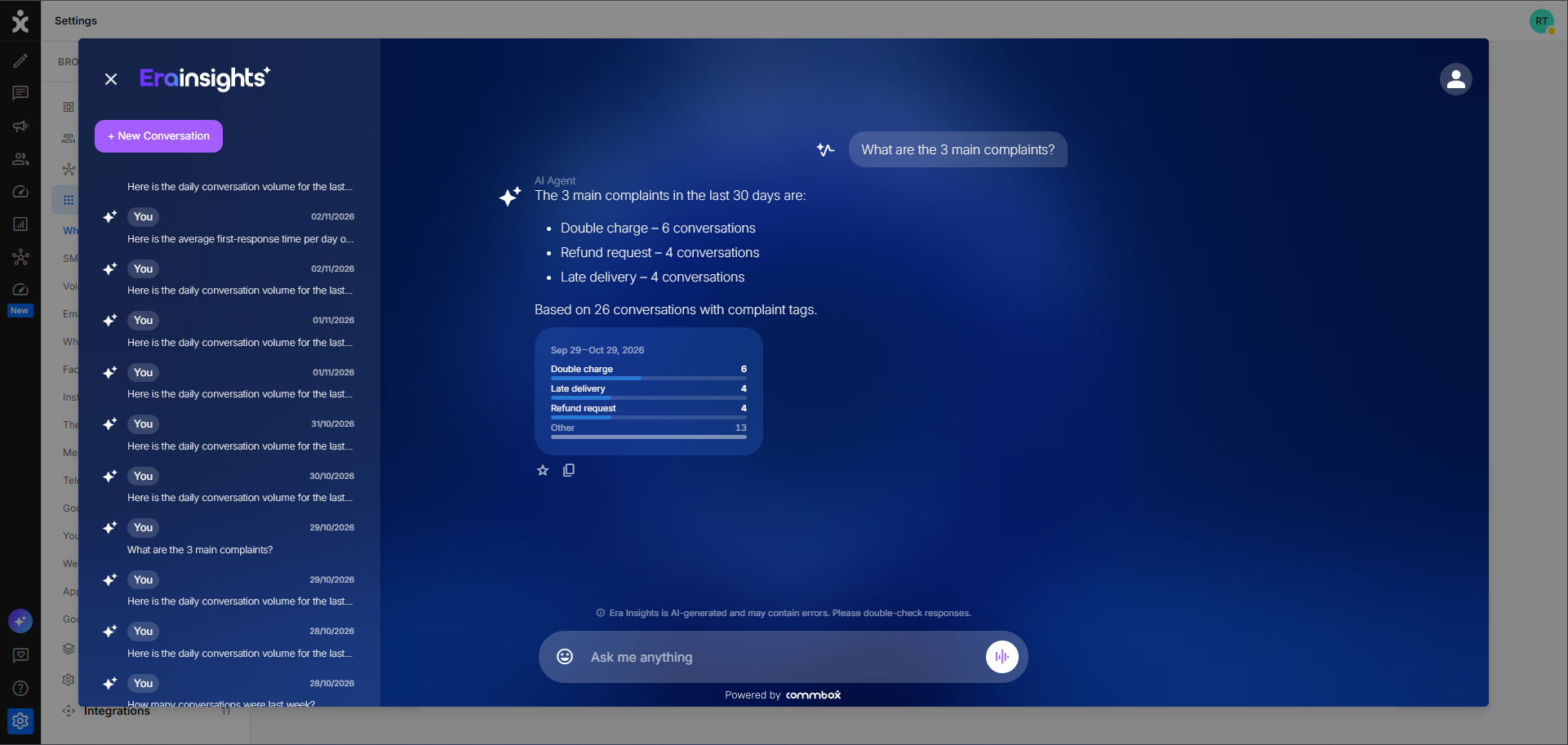
Era Insights answers and Pulse reports now include visualizations alongside text summaries, making it easier to compare results, identify trends, and understand key metrics. Visualizations are available in conversation answers even when the question is not pinned.
Era Insights automatically selects the appropriate format based on the results, including numeric indicators, bar, column, line, and donut charts. The same question uses a consistent visualization format across conversations, Welcome Screen Cards, and Pulse reports.
You can also copy an AI response using its Copy button and compose multi-line questions using Shift+Enter to insert a line break. Enter continues to send the question.
Inbox UI
Enhancement - Clearer Display of Delayed Messages
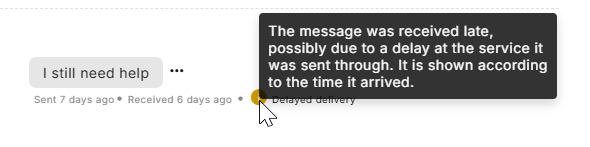
Delayed incoming messages now appear in the conversation according to their arrival time, making newly received messages easier for agents to find. This helps agents understand the sequence of events and identify which message reopened a conversation, even if the customer sent it earlier.
Late messages display both the sent and received times. When the delay exceeds 5 minutes, a warning icon and Delayed delivery label help agents recognize that the message arrived late and avoid mistaking it for a new customer follow-up.
Hover over the warning icon for an explanation or over either timestamp to view the full date and time, including seconds.
Voice API
Enhancement - Increased Voice Transcription File Size Limit
The maximum recording size for voice transcription uploads via the Transcribe API has been increased to 150 MB, allowing organizations to transcribe longer call recordings without being restricted by the standard attachment size limit.
This limit applies across all organizations and is managed automatically by the system. The existing attachment size limit for regular files remains unchanged.
Integrations Webhooks
Enhancement - Bulk Retry for Failed Webhooks
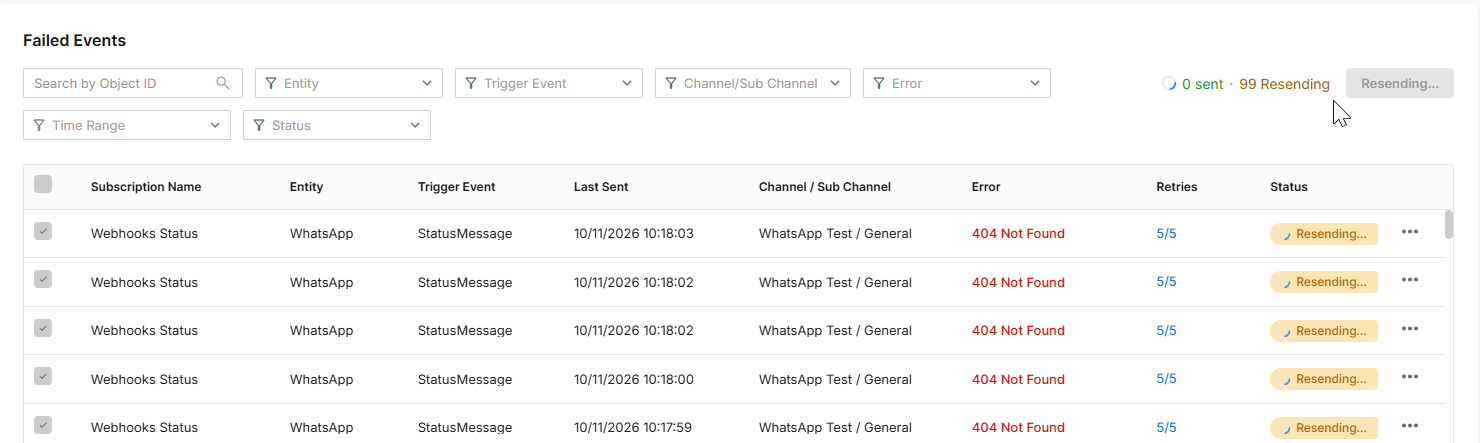
Account Owners and Brand Admins can now select multiple failed webhook events and resend them in one action, helping recover deliveries after an integration outage.
Selections are retained across table pages, with a default limit of 100 selected events. Live status updates and a completion summary show which events were sent successfully and which remain failed.
Only one bulk resend can run per brand at a time.
Click here to learn more about webhooks.
Custom Fields
Enhancement - Deactivate and Restore Custom Fields
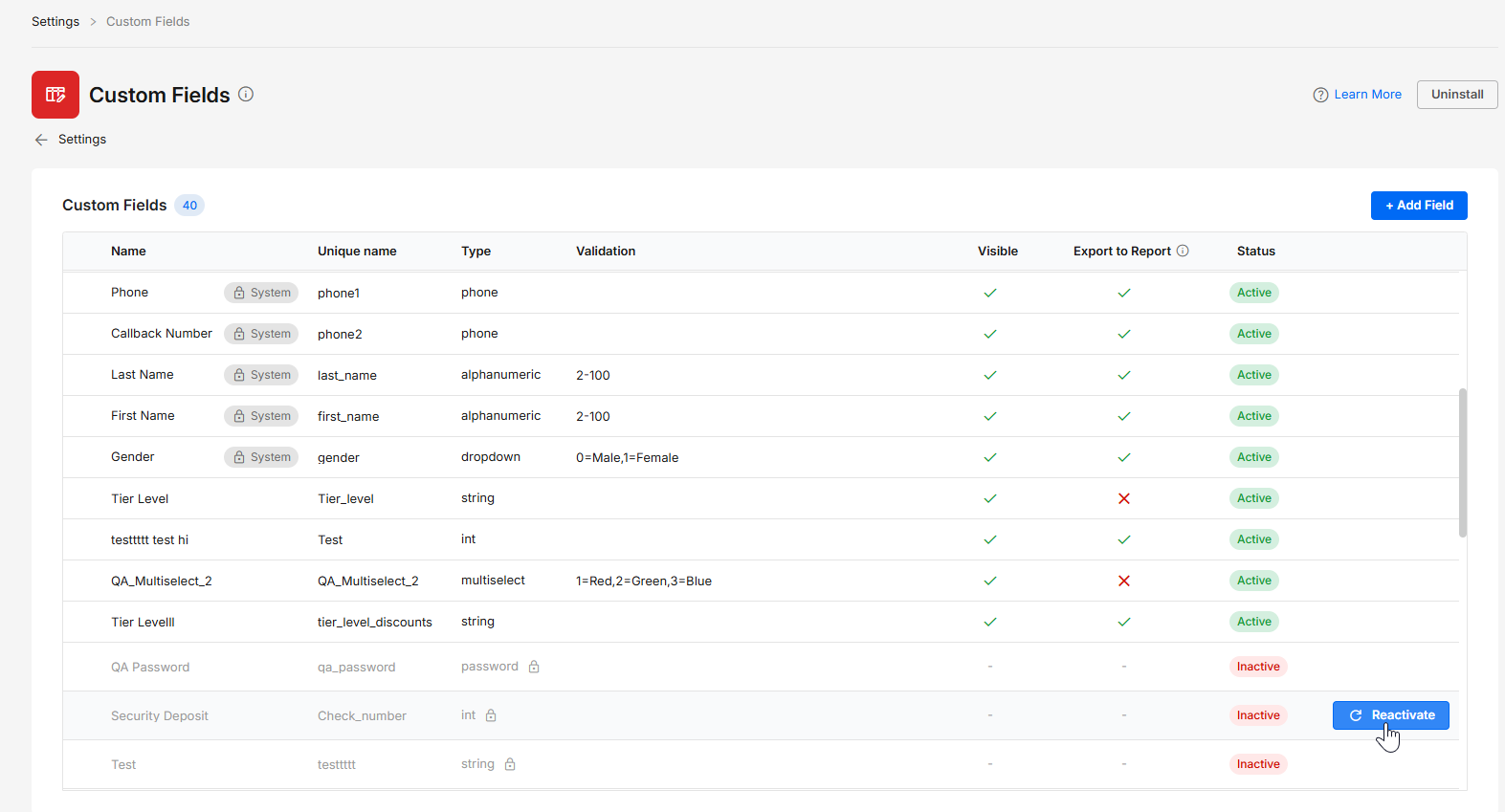
Admins can now deactivate custom fields that are no longer needed and restore them later without losing existing customer data. Inactive fields appear at the end of the Custom Fields table and retain their original type, unique name, visibility, and export settings.
While inactive, fields are excluded from the Customer Card, search, public API, and Customer Report exports. Restoring a field makes its stored customer values available again, according to its visibility and export settings.
A field’s type cannot be changed after creation, and its unique name remains reserved while inactive. Restored fields must be manually added back to login forms on active channels where needed.
Click here to learn more about Custom Fields.