2026 Release Notes
Release Date: Aug 9, 2026
Release Notes Publication: Aug 2, 2026
Campaigns WhatsApp SMS
New – New Campaigns Board
.png)
The Campaign Overview and Metrics page has been improved to provide a clearer, faster, and more efficient way to monitor and manage campaigns. Users can now quickly understand key metrics, locate specific campaigns, and focus on the information that matters most. The updated overview page includes improved navigation, filtering, and search capabilities, enabling users to find campaigns with minimal effort.
Campaigns are now separated into Active, Scheduled, and History tabs, making it easier to navigate between campaign states and reducing clutter. In addition, Follow-Up campaigns are now displayed directly under the original campaign in the campaign list, allowing users to easily track follow-up status and monitor retry or fallback activity without leaving the overview page.
Click here to learn more about WhatsApp Campaigns.
Click here to learn more about SMS Campaigns.
Voice Transcription API Customers' Requested Feature
New – Voice Call Transcription
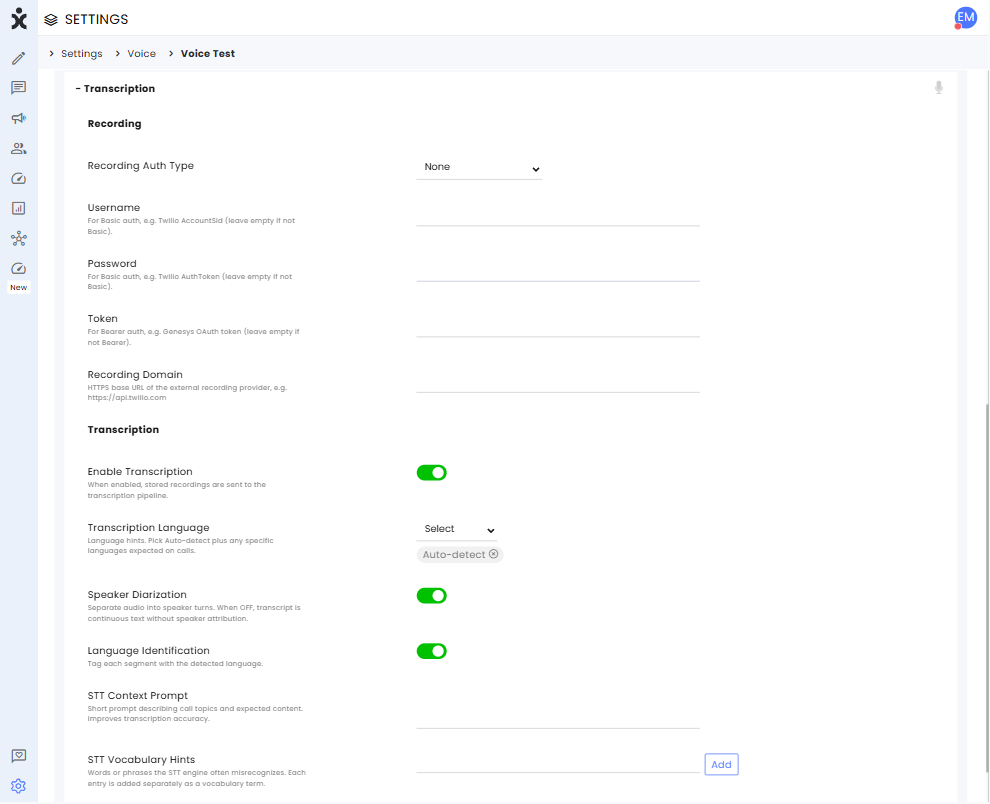
Voice calls can now be automatically transcribed into readable, searchable conversations with speaker attribution, making it easier to review interactions, locate key information, and leverage transcripts across CommBox.
Admins can enable transcription per Voice channel and customize transcription behavior, including language detection, speaker identification, and speech recognition settings. Transcripts are added directly to the conversation and work seamlessly with existing capabilities such as Inbox and Search.
Also included is the new Transcribe API, which enables external Voice providers to submit recordings for transcription and track their processing status. The API supports both Voice and Chat conversations.
Click here to learn more about this capability.
Webhook
New – Manual Webhook Event Retry
.png)
Admins can now manually resend failed webhook events on demand, without waiting for the automatic retry schedule. This enables faster recovery after fixing endpoint issues and helps ensure critical data is delivered successfully.
The new Resend option is available from the Failed Events table and event details view. Each manual retry is tracked separately in the Retry History, allowing users to distinguish between manual and automatic retry attempts and view their outcomes.
To resend a failed event, go to Webhooks > Failed Events, click the three-dot menu of the desired event, and select Resend. Alternatively, open the event details view and click Resend.
Click here to learn more about Webhooks.
Instagram Customers' Requested Feature
New – Granular Instagram Message Controls
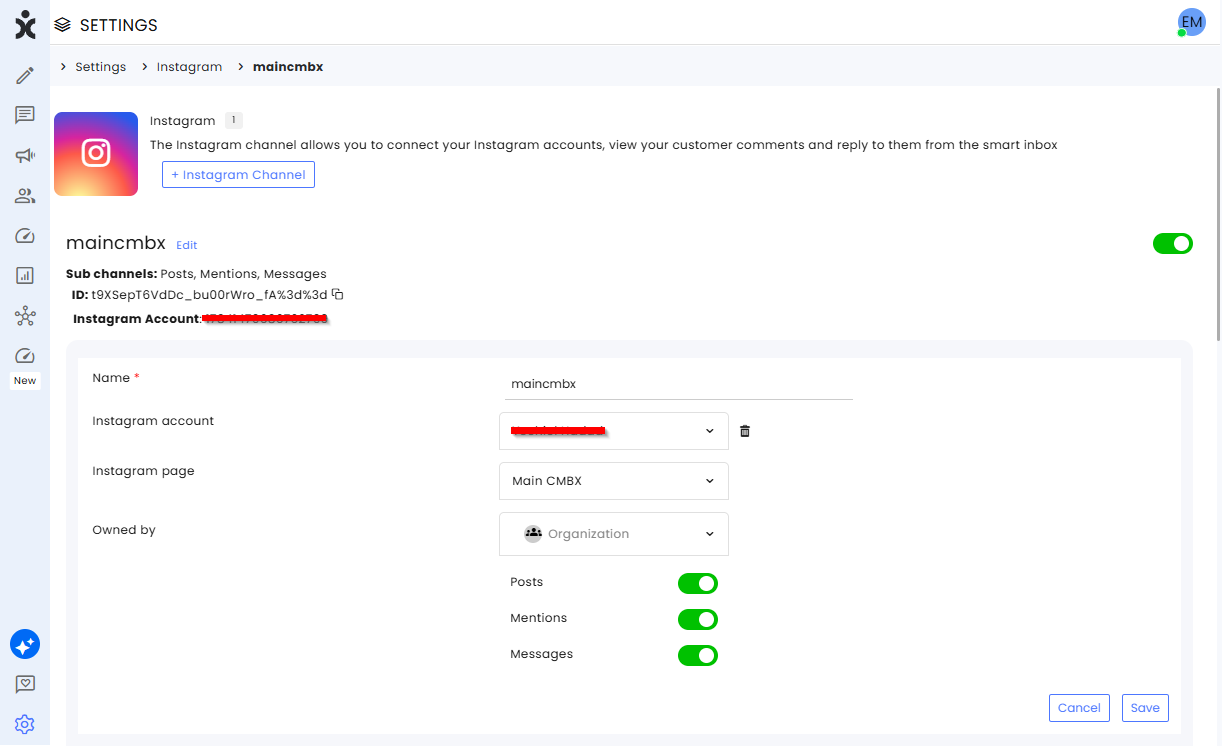
Admins can now control which types of Instagram interactions CommBox receives. Separate settings let you enable or disable Direct Messages, Posts, Mentions, and filter Story Mentions as DMs, enabling greater control over the conversations that are created. This helps reduce inbox noise, route only relevant interactions to agents, and tailor each Instagram channel to the organization's needs.
Existing Instagram channels retain their current behavior, with all options enabled by default.
Click here to learn more about this capability.
AI Agent
New – Quality Control for AI Agents
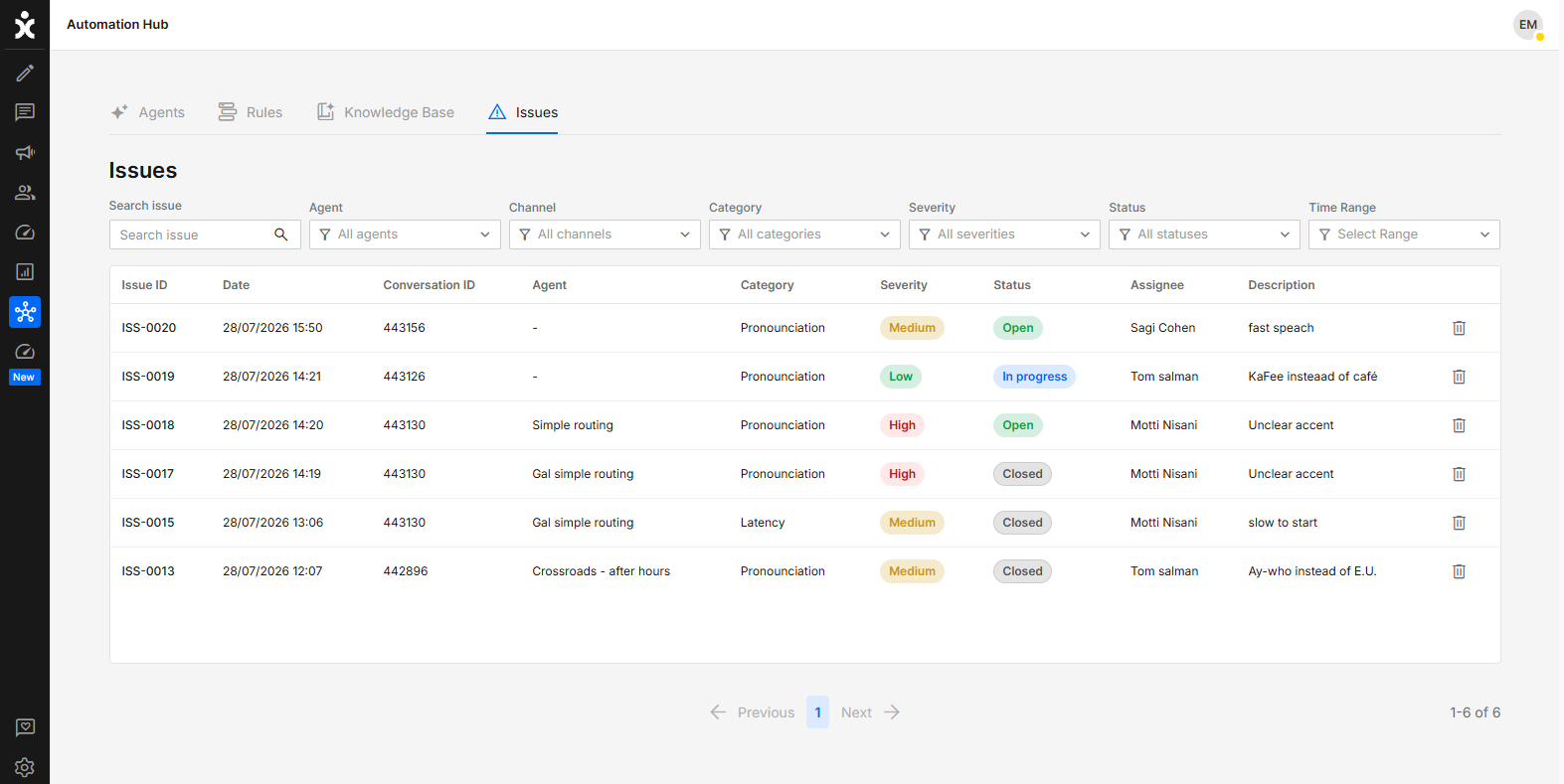
Admins can now report issues directly from AI Agent conversations, making it easier to identify, track, and resolve AI Agent quality issues. All reported issues are centralized in the Issues tab of the Automation Hub, where teams can review, manage, and monitor them to continuously improve AI Agent performance and the overall user experience.
To report an issue, click the 3-dot menu next to the relevant AI Agent message (child) and select Report an issue. Complete the issue details and submit the report. From the Issues board, admins can open an issue, update its status, access the related conversation through a direct link, or delete it if it is no longer applicable.
Click here to learn more about this capability.
Security Email Customers' Requested Feature
New – Email 2FA
Admins can now select Email as the OTP delivery channel for Two-Factor Authentication, enforcing 2FA login security via email in line with the organization's security and compliance requirements. SMS remains the default OTP delivery channel unless Email is selected.
Click here for the updated guide.
Voice Chat Customers' Requested Feature
New – WebRTC Voice Call Recording
Organizations can now record voice calls made through WebRTC channels, providing agents and supervisors access to call recordings for review, quality assurance, and compliance needs.
When enabled, recordings automatically start when a call connects and are available for playback or download directly from the conversation after the call ends. Role-based permissions ensure agents can access their own recordings, while supervisors can access recordings for their teams.
To activate this capability, navigate to Settings > Voice Chat > General channel settings, and enable Recording.
Please check local regulations before enabling this feature.
Voice AI Agent Customers' Requested Feature
New – AI Agent Voice Recordings
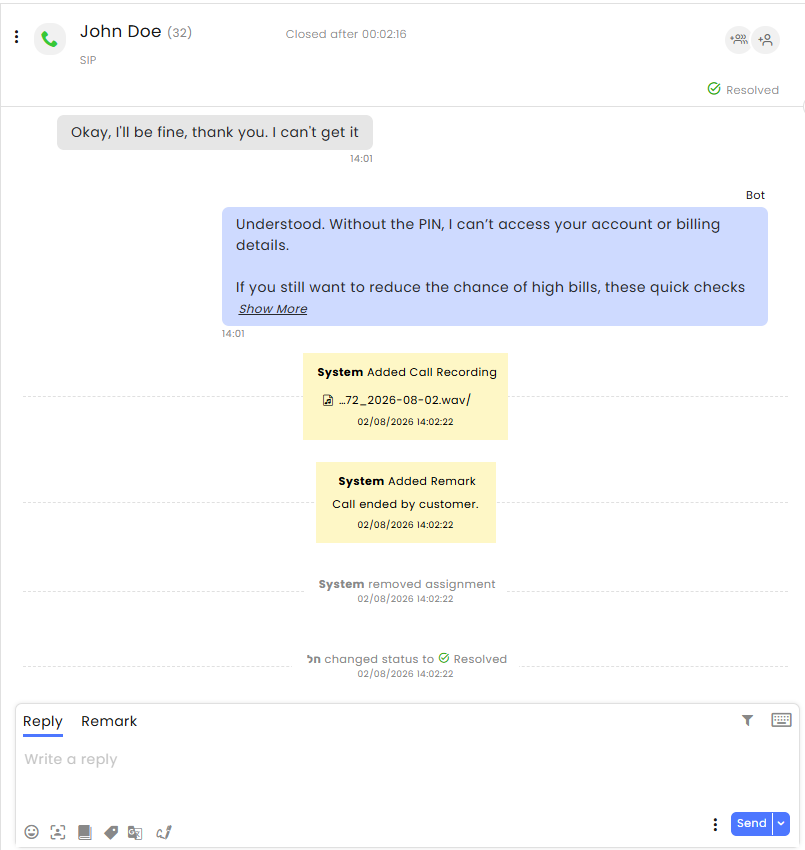
Voice AI Agents can now have their calls recorded, enabling conversation review, quality monitoring, troubleshooting, and compliance tracking. Recordings provide visibility into AI Agent interactions and can help identify opportunities for improving AI Agent performance.
Enable Recording in the SIP Channel settings. The Recording is displayed in Remarks as a link, one minute after the call ends.
Real-time Dashboard Customers' Requested Feature
New – Agent Time in Voice Channel Status
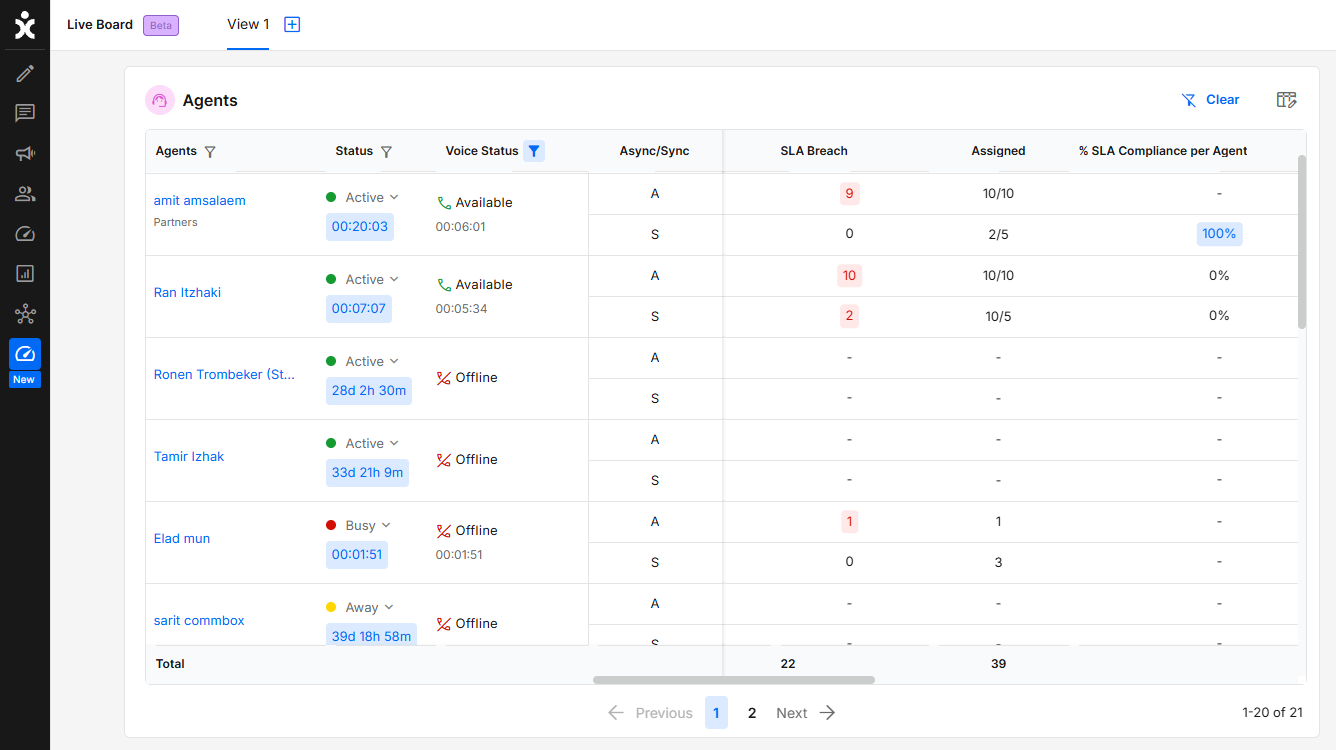
The Real-Time Dashboard now displays how long each agent has been in their current Voice status, including all AWS statuses. This gives supervisors better visibility into agent activity, making it easier to manage workloads, monitor availability, and identify agents who have remained in the same status for an extended period.
Search Inbox Customers' Requested Feature
New – Agent Involved Filter in Advanced Search
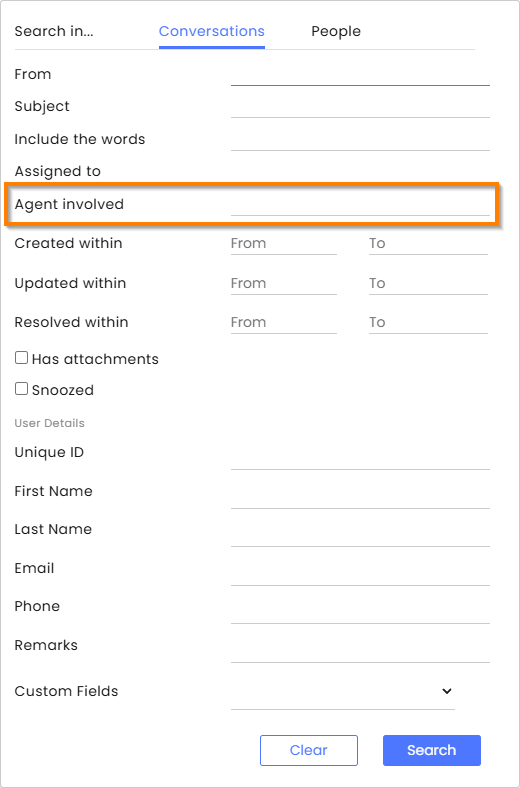
Supervisors and admins can now filter conversations in Advanced Search by the agent who handled them, regardless of assignment. This makes it easier to audit interactions, review agent performance, investigate customer cases, and monitor workloads. For the best results, combine this filter with additional criteria, such as a date range, to quickly locate relevant conversations.
Click here to learn more about this topic.
Real-Time Dashboard SLA Customers' Requested Feature
New – Agent-Level SLA Compliance
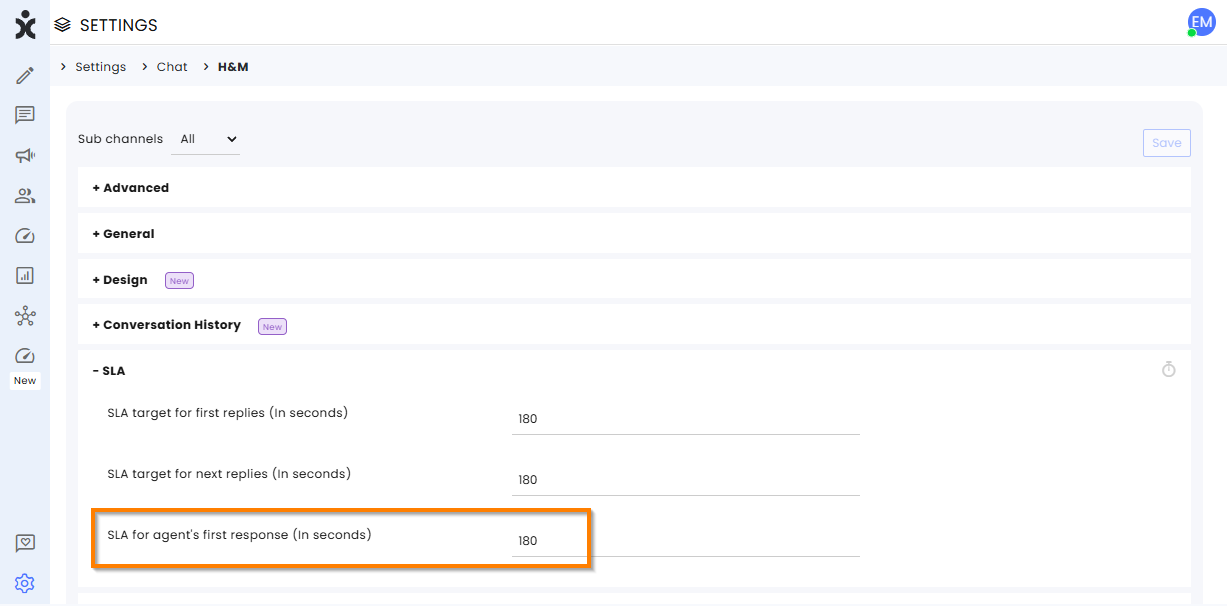
CommBox now supports tracking SLA compliance per agent. A new SLA for Agent First Response setting allows defining the expected response time after a conversation is assigned to an agent.
A new % SLA Compliance per Agent column in the Agents Table shows the percentage of conversations where the agent provided the first response within the defined SLA time. Only conversations where the agent gave the first response are included in the calculation.
AI Conversation Summary
Enhancement – Markdown Support in AI Conversation Summary
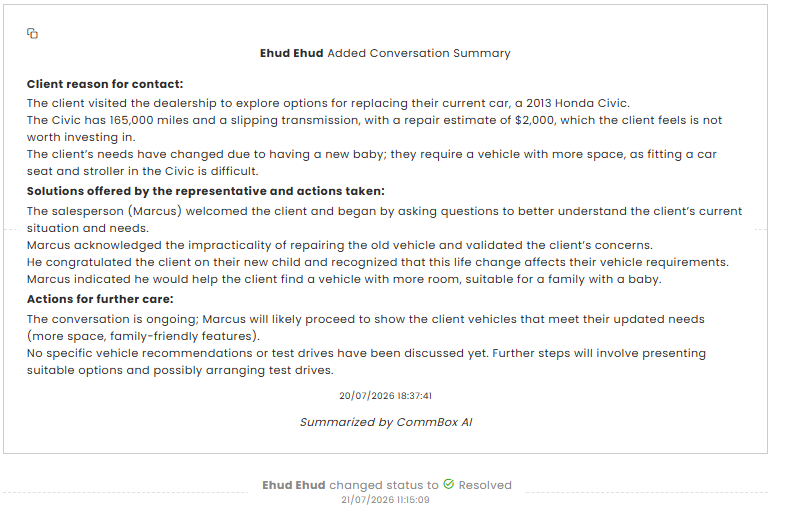
Markdown formatting now renders correctly in AI Conversation Summaries, including proper headings, bold text, bullet lists, indentation, and section spacing. This improves readability and makes summaries easier to review at a glance.
Enhancement - Pre and Post Ability Message
AI Agent
Enhancement – Pre and Post Ability Message
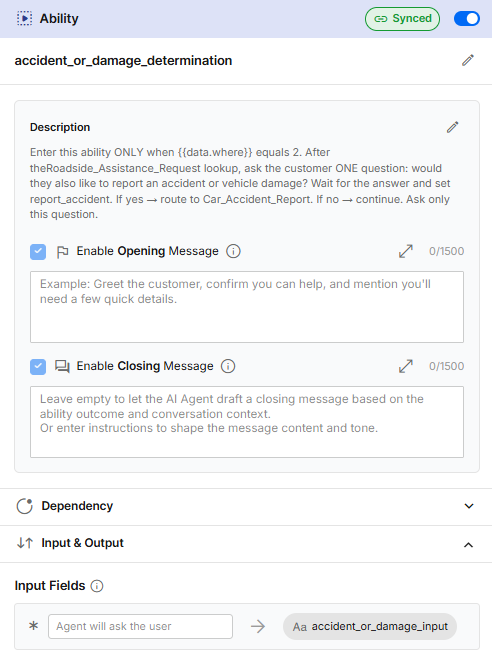
AI Agent designers can now add prompts that the AI Agent uses before and after an Ability is triggered. The opening prompt is always triggered before any conditions or input fields, allowing the AI Agent to address the customer before requesting any information.
Example of an opening prompt: "Start by acknowledging the customer's situation with empathy. Let the customer know you are here to help and explain that you will ask a few questions to assist them."
WhatsApp
Enhancement – Admin Assignments in WhatsApp Groups
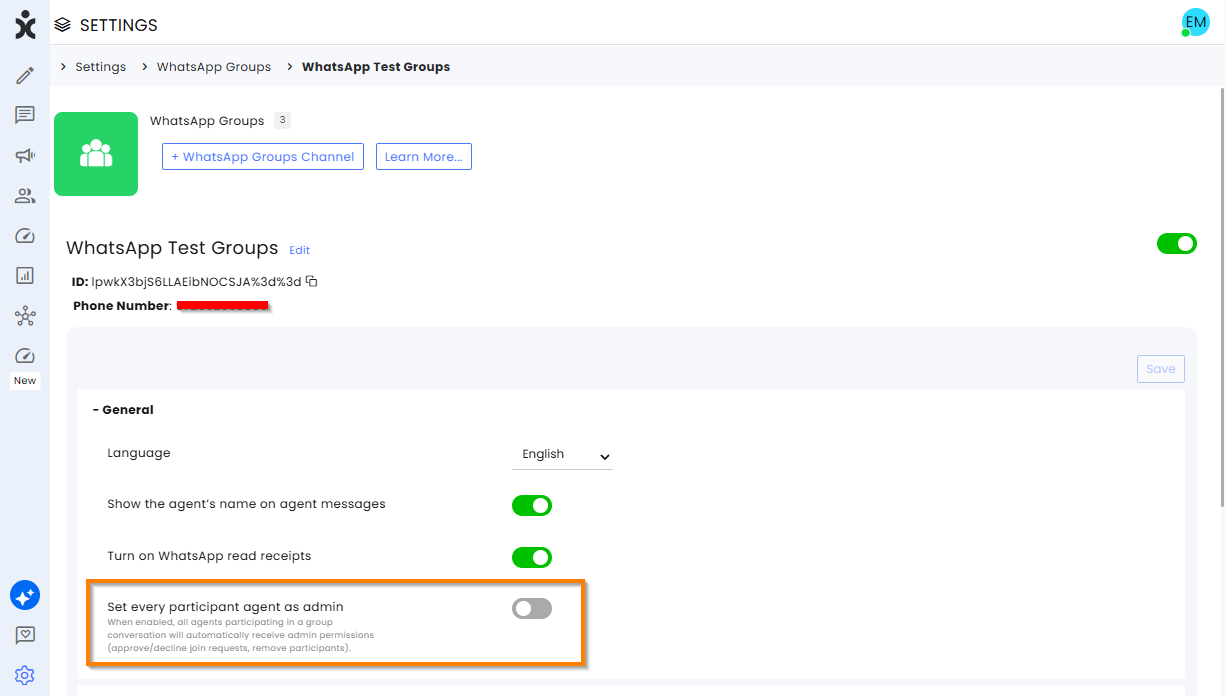
Organizations can now assign all participating agents as administrators of WhatsApp groups. This enables agents to manage group membership, such as adding or removing participants when needed, improving collaboration and reducing the need to rely on a single group administrator.
To enable this feature, navigate to Settings > WhatsApp Groups > General settings in the group's channel, and enable Set every participant agent as an admin.
Click here to learn more about this topic.
UI/UX Customers' Requested Feature
Enhancement – Improved Real-Time Connection Notifications
.png)
CommBox now provides a more prominent notification when an agent's real-time connection is interrupted, improving the visibility of connection issues and reducing the risk of agents unknowingly working with outdated conversation data or missing conversation updates.
When the notification banner disappears, agents can reopen it by clicking the connectivity icon. They can also click the copy icon and paste the diagnostic information about the interruption in order to share it with their IT team or CommBox Support when troubleshooting connectivity issues.
Security Customers' Requested Feature
Enhancement – User Permission for File Attachments
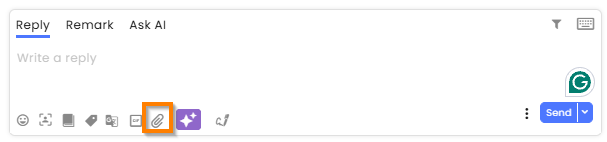
Organizations can now control file attachment permissions on a per-agent basis. Agents without permission no longer see the attachment icon in the Inbox, helping prevent unauthorized file sharing and supporting compliance with organizational security policies. User-level permissions override the channel-level attachment settings configured in the Media section of the Privacy and Security module.
Inbox > Allow File Upload was added to User Permissions, which is On by default.
Integrations
Enhancement – Extended CRM Update Support
The existing Update workflow action has been enhanced to support updating related CRM records in addition to the main record. This allows records, such as transcripts and AI Summaries, to be saved to fields that previously could not be updated after ticket creation, such as the Description field in SAP C4C, the Notes field in Salesforce, and the Annotations field in Microsoft Dynamics.
The enhancement was initially available for SAP C4C and is now being extended to additional CRM integrations, including Salesforce, Microsoft Dynamics, Priority, Oracle Service Cloud, and SysAid.
Campaigns
Enhancement – Campaign Report Failure Reason Details
Campaign reports now provide more detailed visibility into WhatsApp sending failures. The previous Failure Reason column has been split into two columns: Failure Reason Code and Failure Reason Description, making it easier to filter, sort, and analyze delivery failures.
In addition, reports now include all failure reasons returned by WhatsApp (Meta), providing more complete insights into campaign delivery issues. Existing supported errors will continue to be displayed in the configured language, while new unsupported errors will appear in their original English text until localized.
Click here to learn more about this topic.
AI Agent
Enhancement – Knowledge Base Description for AI Agents
.png)
A new Description field has been added to the Knowledge Base configuration in AI Agent settings. The description helps the AI Agent determine when to use a specific Knowledge Base, enabling it to make more accurate and consistent decisions when both Abilities and Knowledge Bases are available.
For example, you can specify that a Knowledge Base should be used for product documentation, return policies, or other specific topics. The description is passed to the AI model, improving tool selection and reducing inconsistent responses.
Note: This enhancement applies only to AI Agents. There is no change to Chatbot or AI Chatbot behavior.
Click here to learn more about AI Agent Settings.
AI Agent
Enhancement – AI Agent Opening Statement
For AI Agents used with Voice channels, admins can now configure an opening statement to play while initial processing is taking place. This reduces perceived latency by greeting callers immediately, creating a faster and more seamless experience. For example: "Hi! You've reached the [Company] call center. How can we help you today?"
Click here for the updated guide.
AI Agent Voice
Enhancement – AI Agent TTS Clarification
Designers of AI Agents used with Voice channels can now define how the AI Agent should pronounce common organizational terms during conversations. This helps ensure that acronyms and terms are spoken correctly rather than read literally. For example, in a medical center, designers can configure "US" to be pronounced as "Ultrasound" rather than "U.S." or "United States."
Click here for the updated guide.
Real Time Dashboard
Enhancement – Agents Load Widgets
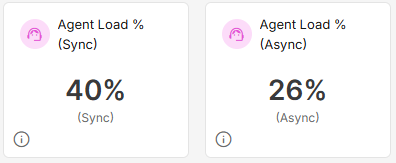
Two new Agent Load % widgets have been added to the Real Time Dashboard, providing a real-time view of the team's workload relative to its capacity. Separate widgets are available for Asynchronous and Synchronous channels, each using the corresponding assignment limits and currently assigned conversations.
The widgets calculate the average load across the included agents, helping supervisors quickly identify overall team capacity and make more informed staffing and workload decisions. The included agents are determined based on the automatic assignment configuration or, when automatic assignment is disabled, agents currently in an active status.
Note: Voice channels are included in the Synchronous Average Load calculation. Team capacity for voice channels is configured in the General module settings.